> ## Documentation Index
> Fetch the complete documentation index at: https://docs.aihubmix.com/llms.txt
> Use this file to discover all available pages before exploring further.
# Gemini Imagine
> Gemini image/video generation
## Imagen Guide
Imagen is an advanced series of image generation AI models developed by Google, capable of creating high-quality, realistic images based on text prompts. This guide will help you understand how to use the Imagen API to generate images, including parameter settings, model selection, and code examples.
Available Models:
* imagen-4.0-ultra-generate-001
* imagen-4.0-generate-001
* imagen-4.0-fast-generate-001
* imagen-4.0-fast-generate-preview-06-06
* imagen-3.0-generate-002
1. Currently, Imagen only supports English prompts. When integrating, it's recommended to add automatic translation to allow users to use it without language barriers.
2. Performance is unstable when rendering large amounts of text. It's recommended to only include key keywords.
### Model Parameters
Imagen currently only supports English prompts and provides the following parameters:
* **numberOfImages**: The number of images to generate, ranging from 1 to 4 (inclusive). The default value is 4.
* `imagen-4.0-ultra-generate-001` can only generate 1 image at a time.
* **aspectRatio**: Changes the aspect ratio of the generated images. Supported values are "1:1", "3:4", "4:3", "9:16", and "16:9". The default value is "1:1".
* **personGeneration**: Allows the model to generate images of people. Supports the following values:
* "DONT\_ALLOW": Prevents the generation of images containing people.
* "ALLOW\_ADULT": Generates images of adults but not children. This is the default value.
### Usage Pricing
The cost of using the Imagen API to generate images:
* imagen-4-ultra:\$0.06/image
* imagen-4:\$0.04/image
* imagen-4-fast:\$0.02/image
* imagen-3:\$0.03/image
Please note that each API call can generate 1-4 images, and you will be charged based on the actual number of images generated.
### API Call Example
Here's a Python example of generating images using Imagen 3.0:
```py Imagen theme={null}
import os
import time
from google import genai
from google.genai import types
from PIL import Image
from io import BytesIO
client = genai.Client(
api_key="sk-***", # 🔑 Replace with your key generated on AiHubMix
http_options={"base_url": "https://aihubmix.com/gemini"},
)
# Currently only supports English prompts, performance is poor with large amounts of text
response = client.models.generate_images(
model='imagen-4.0-fast-generate-001',
prompt='A minimalist logo for a LLM router market company on a solid white background. trident in a circle as the main symbol, with ONLY text \'InferEra\' below.',
config=types.GenerateImagesConfig(
number_of_images=1,
aspect_ratio="1:1", # supports "1:1", "9:16", "16:9", "3:4", or "4:3".
)
)
script_dir = os.path.dirname(os.path.abspath(__file__))
output_dir = os.path.join(script_dir, "output")
os.makedirs(output_dir, exist_ok=True)
# Generate timestamp as filename prefix to avoid filename conflicts
timestamp = int(time.time())
# Save and display the generated images
if response and hasattr(response, 'generated_images') and response.generated_images:
for i, generated_image in enumerate(response.generated_images):
try:
image = Image.open(BytesIO(generated_image.image.image_bytes))
image.show()
file_name = f"imagen3_{timestamp}_{i+1}.png"
file_path = os.path.join(output_dir, file_name)
image.save(file_path)
print(f"Image saved to: {file_path}")
except Exception as e:
print(f"Error processing image {i+1}: {e}")
else:
print("Error: No valid image response received")
print(f"Response type: {type(response)}")
if response:
print(f"Response attributes: {dir(response)}")
if hasattr(response, 'generated_images'):
print(f"generated_images value: {response.generated_images}")
else:
print("Response is empty, please check API key and network connection")
```
### Prompt Tips
Creating effective prompts is crucial for obtaining desired images:
* Use detailed descriptions, including subject, style, lighting, angle, etc.
* Specify artistic styles (such as cinematic, photorealistic, anime style, etc.).
* Include technical details (such as DSLR, high-definition, rich in detail, etc.).
* Avoid negative or prohibited content.
* **Avoid including large amounts of text in prompts**, only use key keywords for more stable results.
## Gemini Image Generation
Gemini also offers image generation capabilities as an alternative. Compared to Imagen, Gemini's image generation is better suited for scenarios that require contextual understanding and reasoning, rather than pursuing ultimate artistic expression and visual quality.
**Instructions:**
* Model id: `gemini-2.5-flash-image-preview`
* Input/Outpt pricing: Text: \$0.3→\$2.5/M tokens; Image: \$0.3→\$30/M tokens
* Need to add parameters to experience new features: `"modalities":["text","image"]`
* Images are passed and output in Base64 encoding
* Default height for output images is 1024px
* Python calls require the latest OpenAI SDK, run `pip install -U openai` first
* For more information, visit the [Gemini official documentation](https://ai.google.dev/gemini-api/docs/image-generation)
**Input Reference Structure:**
```json theme={null}
"modalities": ["text","image"]
{
"model": "gemini-2.5-flash-image-preview",
"messages": [
{
"role": "user",
"content": "Generate a landscape painting and provide a poem to describe it"
}
],
"modalities":["text","image"], //need to add image
"temperature": 0.7
}'
```
**Output Reference Structure:**
```json theme={null}
"choices":
[
{
"index": 0,
"message":
{
"role": "assistant",
"content": "Hello! How can I assist you today?",
"refusal": null,
"multi_mod_content": //📍 New addition
[
{
"text": "",
"inlineData":
{
"data":"base64 str",
"mimeType":"png"
}
},
{
"text": "hello",
"inlineData":
{
}
}
],
"annotations":
[]
},
"logprobs": null,
"finish_reason": "stop"
}
],
```
### Text-to-Image Generation
Input: text
Output: text + image
```shell Curl theme={null}
IMG_PATH="/your_path/image.jpg"
if [[ "$(base64 --version 2>&1)" = *"FreeBSD"* ]]; then
B64FLAGS="--input"
else
B64FLAGS="-w0"
fi
IMG_BASE64=$(base64 "$B64FLAGS" "$IMG_PATH" 2>&1)
curl https://aihubmix.com/v1/chat/completions \
-H "Content-Type: application/json" \
-H "Authorization: Bearer sk-***" \
-d '{
"model": "gemini-2.5-flash-image-preview",
"messages": [
{
"role": "user",
"content": [
{
"type":"text",
"text":"describe the image with a concise and engaging paragraph, then fill color as children's crayon style"
},
{
"type": "image_url",
"image_url": {
"url": "data:image/jpeg;base64,'$IMG_BASE64'"
}
}
]
}
],
"modalities": ["text","image"],
"temperature": 0.7
}' \
| grep -o '"data":"[^"]*"' \
| cut -d'"' -f4 \
| base64 --decode > /your_path/imageGen.jpg
```
```py OpenAI Python theme={null}
import os
from openai import OpenAI
from PIL import Image
from io import BytesIO
import base64
client = OpenAI(
api_key="sk-***", # 🔑 Replace with your key generated on AiHubMix
base_url="https://aihubmix.com/v1",
)
# Using text-only input
response = client.chat.completions.create(
model="gemini-2.5-flash-image-preview",
messages=[
{
"role": "user",
"content": [
{
"type": "text",
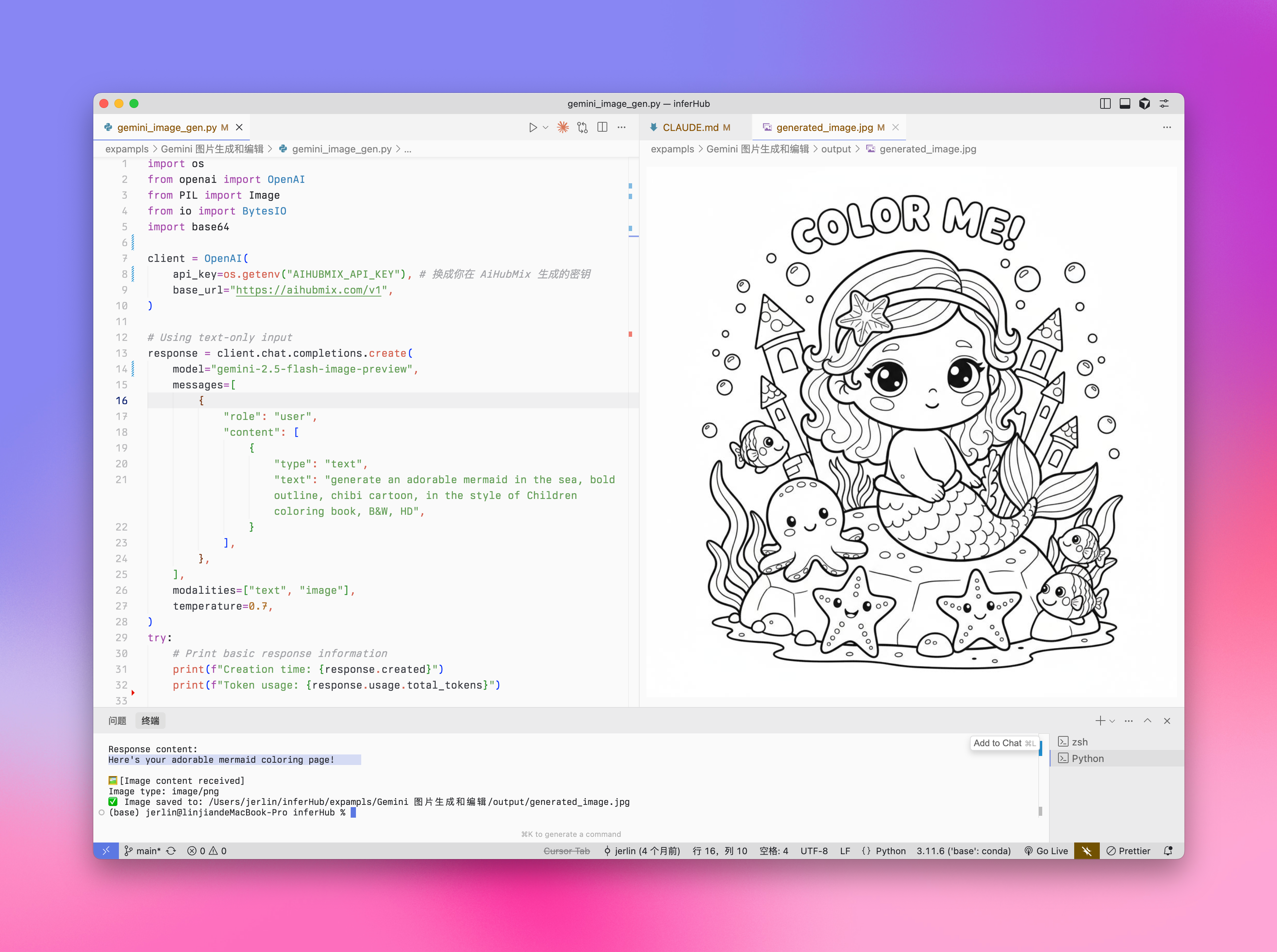
"text": "generate an adorable mermaid in the sea, bold outline, chibi cartoon, in the style of Children coloring book, B&W",
}
],
},
],
modalities=["text", "image"],
temperature=0.7,
)
try:
# Print basic response information
print(f"Creation time: {response.created}")
print(f"Token usage: {response.usage.total_tokens}")
# Check if multi_mod_content field exists
if (
hasattr(response.choices[0].message, "multi_mod_content")
and response.choices[0].message.multi_mod_content is not None
):
print("\nResponse content:")
for part in response.choices[0].message.multi_mod_content:
if "text" in part and part["text"] is not None:
print(part["text"])
# Process image content
elif "inline_data" in part and part["inline_data"] is not None:
print("\n🖼️ [Image content received]")
image_data = base64.b64decode(part["inline_data"]["data"])
mime_type = part["inline_data"].get("mime_type", "image/png")
print(f"Image type: {mime_type}")
image = Image.open(BytesIO(image_data))
image.show()
# Save image
output_dir = os.path.join(os.path.dirname(os.path.abspath(__file__)), "output")
os.makedirs(output_dir, exist_ok=True)
output_path = os.path.join(output_dir, "generated_image.png")
image.save(output_path)
print(f"✅ Image saved to: {output_path}")
else:
print("No valid multimodal response received, check response structure")
except Exception as e:
print(f"Error processing response: {str(e)}")
```
```py Gemini Python theme={null}
import mimetypes
from google import genai
from google.genai import types
import os
def save_binary_file(file_name, data):
f = open(file_name, "wb")
f.write(data)
f.close()
print(f"File saved to to: {file_name}")
def generate():
client = genai.Client(
api_key="sk-***", # 🔑 Replace with your key generated on AiHubMix
http_options={"base_url": "https://aihubmix.com/gemini"},
)
model = "gemini-2.5-flash-image-preview"
contents = [
types.Content(
role="user",
parts=[
types.Part.from_text(text="""generate image: an adorable mermaid in the sea, bold outline, chibi cartoon, in the style of Children coloring book, super cute, B&W, HD"""),
],
),
]
generate_content_config = types.GenerateContentConfig(
response_modalities=[
"IMAGE",
"TEXT",
],
)
file_index = 0
for chunk in client.models.generate_content_stream(
model=model,
contents=contents,
config=generate_content_config,
):
if (
chunk.candidates is None
or chunk.candidates[0].content is None
or chunk.candidates[0].content.parts is None
):
continue
if chunk.candidates[0].content.parts[0].inline_data and chunk.candidates[0].content.parts[0].inline_data.data:
file_name = f"ENTER_FILE_NAME_{file_index}"
file_index += 1
inline_data = chunk.candidates[0].content.parts[0].inline_data
data_buffer = inline_data.data
file_extension = mimetypes.guess_extension(inline_data.mime_type)
save_binary_file(f"{file_name}{file_extension}", data_buffer)
else:
print(chunk.text)
if __name__ == "__main__":
generate()
```
**Output Example:**
 ### Edit Image
Input: text + image\
Output: text + image
```py Python theme={null}
import os
from openai import OpenAI
from PIL import Image
from io import BytesIO
import base64
client = OpenAI(
api_key="sk-***", # 🔑 Replace with your key generated on AiHubMix
base_url="https://aihubmix.com/v1",
)
project_root = os.path.dirname(os.path.dirname(os.path.abspath(__file__)))
image_path = os.path.join(os.path.dirname(os.path.abspath(__file__)), "resources", "filled.jpg")
if not os.path.exists(image_path):
raise FileNotFoundError(f"image {image_path} not exists")
def encode_image(image_path):
with open(image_path, "rb") as image_file:
return base64.b64encode(image_file.read()).decode("utf-8")
base64_image = encode_image(image_path)
response = client.chat.completions.create(
model="gemini-2.5-flash-image-preview",
messages=[
{
"role": "user",
"content": [
{
"type": "text",
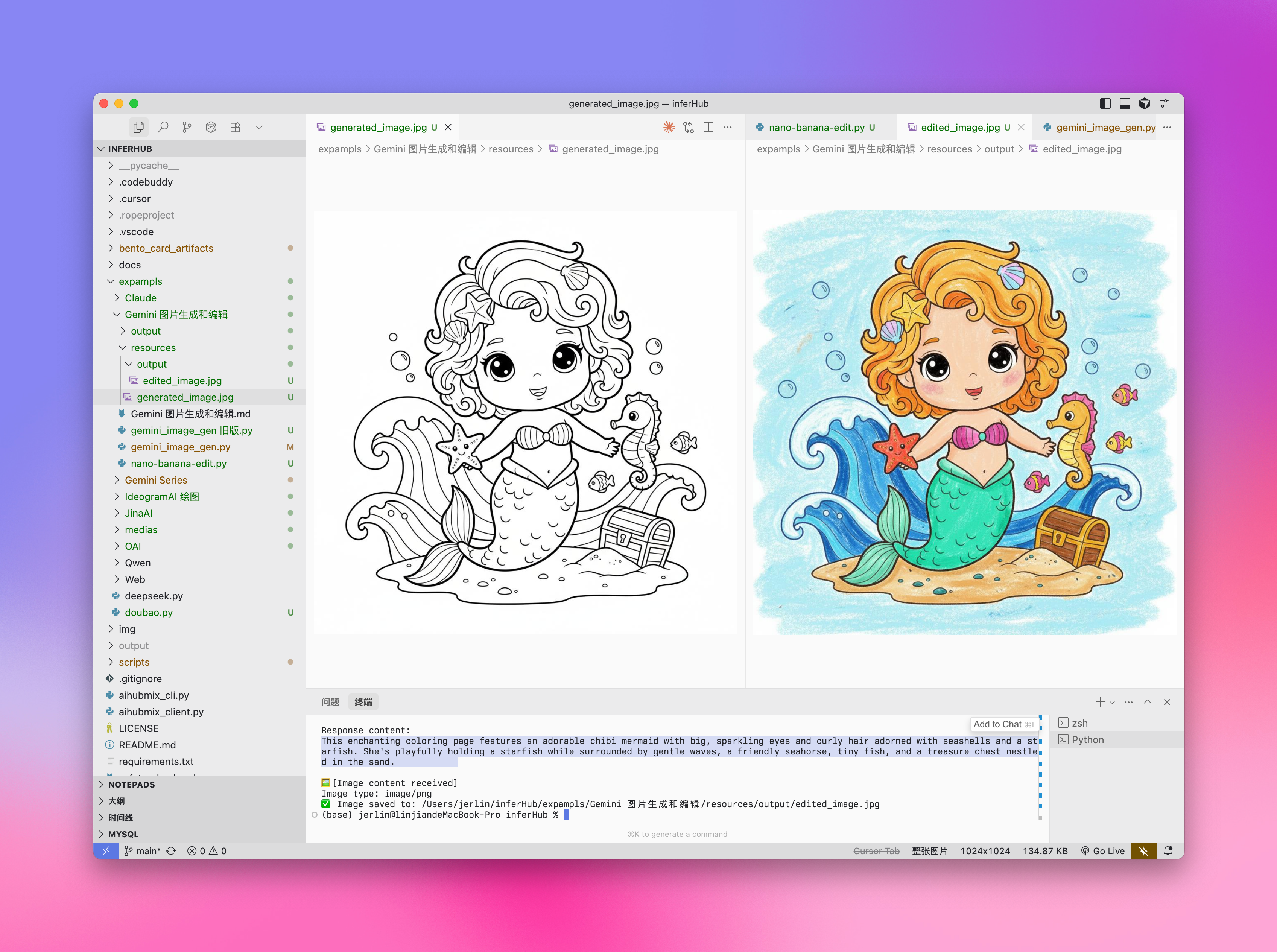
"text": "describe the image with a concise and engaging paragraph, then fill color as children's crayon style",
},
{
"type": "image_url",
"image_url": {"url": f"data:image/jpeg;base64,{base64_image}"},
},
],
},
],
modalities=["text", "image"],
temperature=0.7,
)
try:
# Print basic response information without base64 data
print(f"Creation time: {response.created}")
print(f"Token usage: {response.usage.total_tokens}")
# Check if multi_mod_content field exists
if (
hasattr(response.choices[0].message, "multi_mod_content")
and response.choices[0].message.multi_mod_content is not None
):
print("\nResponse content:")
for part in response.choices[0].message.multi_mod_content:
if "text" in part and part["text"] is not None:
print(part["text"])
# Process image content
elif "inline_data" in part and part["inline_data"] is not None:
print("\n🖼️ [Image content received]")
image_data = base64.b64decode(part["inline_data"]["data"])
mime_type = part["inline_data"].get("mime_type", "image/png")
print(f"Image type: {mime_type}")
image = Image.open(BytesIO(image_data))
image.show()
# Save image
output_dir = os.path.join(os.path.dirname(image_path), "output")
os.makedirs(output_dir, exist_ok=True)
output_path = os.path.join(output_dir, "edited_image.jpg")
image.save(output_path)
print(f"✅ Image saved to: {output_path}")
else:
print("No valid multimodal response received, check response structure")
except Exception as e:
print(f"Error processing response: {str(e)}")
```
**Output Example:**
### Edit Image
Input: text + image\
Output: text + image
```py Python theme={null}
import os
from openai import OpenAI
from PIL import Image
from io import BytesIO
import base64
client = OpenAI(
api_key="sk-***", # 🔑 Replace with your key generated on AiHubMix
base_url="https://aihubmix.com/v1",
)
project_root = os.path.dirname(os.path.dirname(os.path.abspath(__file__)))
image_path = os.path.join(os.path.dirname(os.path.abspath(__file__)), "resources", "filled.jpg")
if not os.path.exists(image_path):
raise FileNotFoundError(f"image {image_path} not exists")
def encode_image(image_path):
with open(image_path, "rb") as image_file:
return base64.b64encode(image_file.read()).decode("utf-8")
base64_image = encode_image(image_path)
response = client.chat.completions.create(
model="gemini-2.5-flash-image-preview",
messages=[
{
"role": "user",
"content": [
{
"type": "text",
"text": "describe the image with a concise and engaging paragraph, then fill color as children's crayon style",
},
{
"type": "image_url",
"image_url": {"url": f"data:image/jpeg;base64,{base64_image}"},
},
],
},
],
modalities=["text", "image"],
temperature=0.7,
)
try:
# Print basic response information without base64 data
print(f"Creation time: {response.created}")
print(f"Token usage: {response.usage.total_tokens}")
# Check if multi_mod_content field exists
if (
hasattr(response.choices[0].message, "multi_mod_content")
and response.choices[0].message.multi_mod_content is not None
):
print("\nResponse content:")
for part in response.choices[0].message.multi_mod_content:
if "text" in part and part["text"] is not None:
print(part["text"])
# Process image content
elif "inline_data" in part and part["inline_data"] is not None:
print("\n🖼️ [Image content received]")
image_data = base64.b64decode(part["inline_data"]["data"])
mime_type = part["inline_data"].get("mime_type", "image/png")
print(f"Image type: {mime_type}")
image = Image.open(BytesIO(image_data))
image.show()
# Save image
output_dir = os.path.join(os.path.dirname(image_path), "output")
os.makedirs(output_dir, exist_ok=True)
output_path = os.path.join(output_dir, "edited_image.jpg")
image.save(output_path)
print(f"✅ Image saved to: {output_path}")
else:
print("No valid multimodal response received, check response structure")
except Exception as e:
print(f"Error processing response: {str(e)}")
```
**Output Example:**
 ## Choosing the Right Model
### When to Choose Gemini:
* When you need to leverage world knowledge and reasoning abilities to generate contextually relevant images.
* When you need seamless integration of text and images.
* When you want to embed accurate visual content in long text sequences.
* When you want to edit images conversationally while maintaining context.
### When to Choose Imagen:
* When image quality, photorealism, artistic detail, or specific styles (such as impressionism, anime) are the primary considerations.
* When performing professional editing tasks, such as product background updates or image enlargement.
* When injecting branding, style, or generating logos and product designs.
### Best Practices
1. **Optimize prompts**: Carefully crafting prompts is key to obtaining high-quality output.
2. **Experiment with parameters**: Try different aspect ratios and settings to find the configuration that best suits your needs.
3. **Batch generation**: Generate multiple images to increase the chance of getting ideal results.
4. **Save metadata**: Save prompts and timestamps along with images to track and replicate successful results.
5. **Comply with usage policies**: Ensure your usage complies with Google's content policies and terms of service.
## Veo 3.0 Video Generation
VEO 3.0 is the latest advanced video generation model developed by Google DeepMind. With [VEO 3.0](https://aihubmix.com/models?model=veo-3.0-generate-preview), you can generate videos with the following features:
* Enhanced quality from text and image prompts
* Speech, such as dialogue and voiceovers
* Audio, such as music and sound effects
1. Currently, VEO 3.0 only supports English prompts, automatic translation is recommended for integration
2. Videos are usually generated within a few minutes, but may take longer during peak times
3. Currently does not support video generation from image-based conversations
### Known Limitations
Currently, VEO 3.0 parameters are fixed and cannot be changed:
* **Resolution**: 720p (landscape)
* **Frame Rate**: 24fps
* **Video Length**: 8 seconds
### Pricing
The cost of the VEO 3.0 API is **\$0.675/second** (Aihubmix offers a 10% limited-time discount)
### Usage Example
VEO 3.0 currently only supports curl command calls, using a two-step process:
Note: `sk-***` is your key generated on AiHubMix.
```shell Step 1: Initiate Generation Request theme={null}
curl "https://aihubmix.com/gemini/v1beta/models/veo-3.0-generate-preview:predictLongRunning?key=sk-***" \
-H "Content-Type: application/json" \
-X "POST" \
-d '{
"instances":
[
{
"prompt": "A cat playing with a ball"
}
],
"parameters":
{
"numberOfVideos": 1,
"durationSeconds": 8,
"aspectRatio": "16:9",
"personGeneration": "dont_allow"
}
}'
```
```shell Step 2: Get Generation Result theme={null}
# Use the operation ID from the name field returned in Step 1
curl "https://aihubmix.com/gemini/v1beta/models/veo-3.0-generate-preview/operations/ff5***?key=sk-***"
```
```py Video Extraction Script theme={null}
import json
import base64
# 1. Read the response JSON file
with open('yourpath/response.json', 'r') as f:
data = json.load(f)
# 2. Get the base64 encoded video string
b64_str = data['response']['videos'][0]['bytesBase64Encoded']
# 3. Decode and write to mp4 file
with open('output.mp4', 'wb') as f:
f.write(base64.b64decode(b64_str))
print("Video saved as output.mp4")
```
### Response Examples
**Step 1 Response:**
```json theme={null}
{
"name": "models/veo-3.0-generate-preview/operations/ff5***"
}
```
**Step 2 Response (Generation Complete):**
```json theme={null}
{
"name": "projects/ahm-gemini-03/locations/us-central1/publishers/google/models/veo-3.0-generate-preview/operations/ff5***",
"done": true,
"response": {
"@type": "type.googleapis.com/cloud.ai.large_models.vision.GenerateVideoResponse",
"raiMediaFilteredCount": 0,
"videos": [
{
"bytesBase64Encoded": "AAA...2xl",
"mimeType": "video/mp4"
}
]
}
}
```
**Step 2 Response (Still Processing):**
```json theme={null}
{
"name": "projects/ahm-gemini-03/locations/us-central1/publishers/google/models/veo-3.0-generate-preview/operations/777***"
}
```
If you receive a processing response, please wait a few minutes and resend the Step 2 request.
**Video Effect:**
### Best Practices
1. **Be Patient**: Video generation usually takes a few minutes, longer during peak times
2. **Check Status**: If the response doesn't contain `done: true`, it's still processing
3. **Save Operation ID**: Make sure to save the operation ID returned from Step 1 for subsequent queries
4. **Comply with Usage Policies**: Ensure your usage complies with Google's content policies and terms of use
For more information, please refer to the [Vertex AI Official Documentation](https://cloud.google.com/vertex-ai/generative-ai/docs/video/generate-videos)
## Veo 2.0 Video Generation
VEO 2.0 is an advanced video generation AI model launched by Google, capable of creating high-quality, realistic short videos based on text prompts. This part will help you understand how to use the VEO 2.0 API to generate videos, including parameter settings, model selection, and code examples.
1. Currently, VEO 2.0 only supports English prompts
2. Video generation takes approximately 2-3 minutes, please be patient
### Model Parameters
VEO 2.0 provides the following parameters:
* **numberOfVideos**: The number of videos to generate, options are 1 or 2. Default is 2.
* **aspectRatio**: The aspect ratio of the generated videos. Supported values are "16:9" and "9:16".
* **durationSeconds**: Video duration, options are 5 seconds or 8 seconds. Default is 8 seconds.
* **personGeneration**: Controls whether to allow videos containing people. Supports the following values:
* "dont\_allow": Prevents generation of videos containing people.
* "allow\_adult": Allows generation of videos containing adults, but not children.
### Pricing
The cost of the VEO 2.0 API is \$0.35/s
### Usage Example
Here's a Python example of using VEO 2.0 to generate videos:
```py Generate from text theme={null}
import os
import time
from google import genai
from google.genai import types
client = genai.Client(
api_key="sk-***", # 🔑 Replace with your key generated on AiHubMix
http_options={"base_url": "https://aihubmix.com/gemini"},
)
operation = client.models.generate_videos(
model="veo-2.0-generate-001",
prompt="Panning wide shot of a calico kitten sleeping in the sunshine",
config=types.GenerateVideosConfig(
person_generation="dont_allow", # "dont_allow" or "allow_adult"
aspect_ratio="16:9", # "16:9" or "9:16"
number_of_videos=1, # Integer, options are 1 or 2, default is 2
durationSeconds=5, # Integer, options are 5 or 8, default is 8
),
)
# Takes 2-3 minutes, video duration is 5-8s
while not operation.done:
time.sleep(20)
operation = client.operations.get(operation)
for n, generated_video in enumerate(operation.response.generated_videos):
client.files.download(file=generated_video.video)
generated_video.video.save(f"video{n}.mp4") # Save the video
```
```py Generate from images theme={null}
import os
import time
from google import genai
from google.genai import types
def load_image(path):
with open(path, "rb") as image_file:
return image_file.read()
client = genai.Client(
api_key="sk-***", # 🔑 Replace with your key generated on AiHubMix
http_options={"base_url": "https://aihubmix.com/gemini"},
)
operation = client.models.generate_videos(
model="veo-2.0-generate-001",
prompt="The waves in the background keep flowing",
image=types.Image(
mime_type="image/png",
image_bytes=load_image("img/inferbanner.png") # your image path
),
config=types.GenerateVideosConfig(
person_generation="dont_allow",
aspect_ratio="16:9",
numberOfVideos=1,
durationSeconds=5,
),
)
while not operation.done:
time.sleep(20)
operation = client.operations.get(operation)
for n, generated_video in enumerate(operation.response.generated_videos):
client.files.download(file=generated_video.video)
generated_video.video.save(f"video{n}.mp4")
```
### Prompt Tips
Creating effective prompts is crucial for obtaining desired videos:
* Describe clear scenes, actions, and atmosphere
* Specify filming styles (such as panoramic, close-up, tracking shots, etc.)
* Describe lighting conditions (such as sunny, dusk, indoor lighting, etc.)
* Specify the main subject and its actions (e.g., "a kitten sleeping in the sunshine")
* Avoid overly complex narratives or rapidly changing scenes
* Avoid negative or prohibited content
### Best Practices
1. **Clear and concise prompts**: Use clear, specific descriptions to guide video generation.
2. **Patience is key**: Video generation takes 2-3 minutes, please wait for completion.
3. **Test different parameters**: Try different aspect ratios and durations to find the settings that best suit your needs.
4. **Save generation records**: Record prompts along with generated videos to track successful results.
5. **Comply with usage policies**: Ensure your usage complies with Google's content policies and terms of use.
***
Last updated: 2026-06-01
## Choosing the Right Model
### When to Choose Gemini:
* When you need to leverage world knowledge and reasoning abilities to generate contextually relevant images.
* When you need seamless integration of text and images.
* When you want to embed accurate visual content in long text sequences.
* When you want to edit images conversationally while maintaining context.
### When to Choose Imagen:
* When image quality, photorealism, artistic detail, or specific styles (such as impressionism, anime) are the primary considerations.
* When performing professional editing tasks, such as product background updates or image enlargement.
* When injecting branding, style, or generating logos and product designs.
### Best Practices
1. **Optimize prompts**: Carefully crafting prompts is key to obtaining high-quality output.
2. **Experiment with parameters**: Try different aspect ratios and settings to find the configuration that best suits your needs.
3. **Batch generation**: Generate multiple images to increase the chance of getting ideal results.
4. **Save metadata**: Save prompts and timestamps along with images to track and replicate successful results.
5. **Comply with usage policies**: Ensure your usage complies with Google's content policies and terms of service.
## Veo 3.0 Video Generation
VEO 3.0 is the latest advanced video generation model developed by Google DeepMind. With [VEO 3.0](https://aihubmix.com/models?model=veo-3.0-generate-preview), you can generate videos with the following features:
* Enhanced quality from text and image prompts
* Speech, such as dialogue and voiceovers
* Audio, such as music and sound effects
1. Currently, VEO 3.0 only supports English prompts, automatic translation is recommended for integration
2. Videos are usually generated within a few minutes, but may take longer during peak times
3. Currently does not support video generation from image-based conversations
### Known Limitations
Currently, VEO 3.0 parameters are fixed and cannot be changed:
* **Resolution**: 720p (landscape)
* **Frame Rate**: 24fps
* **Video Length**: 8 seconds
### Pricing
The cost of the VEO 3.0 API is **\$0.675/second** (Aihubmix offers a 10% limited-time discount)
### Usage Example
VEO 3.0 currently only supports curl command calls, using a two-step process:
Note: `sk-***` is your key generated on AiHubMix.
```shell Step 1: Initiate Generation Request theme={null}
curl "https://aihubmix.com/gemini/v1beta/models/veo-3.0-generate-preview:predictLongRunning?key=sk-***" \
-H "Content-Type: application/json" \
-X "POST" \
-d '{
"instances":
[
{
"prompt": "A cat playing with a ball"
}
],
"parameters":
{
"numberOfVideos": 1,
"durationSeconds": 8,
"aspectRatio": "16:9",
"personGeneration": "dont_allow"
}
}'
```
```shell Step 2: Get Generation Result theme={null}
# Use the operation ID from the name field returned in Step 1
curl "https://aihubmix.com/gemini/v1beta/models/veo-3.0-generate-preview/operations/ff5***?key=sk-***"
```
```py Video Extraction Script theme={null}
import json
import base64
# 1. Read the response JSON file
with open('yourpath/response.json', 'r') as f:
data = json.load(f)
# 2. Get the base64 encoded video string
b64_str = data['response']['videos'][0]['bytesBase64Encoded']
# 3. Decode and write to mp4 file
with open('output.mp4', 'wb') as f:
f.write(base64.b64decode(b64_str))
print("Video saved as output.mp4")
```
### Response Examples
**Step 1 Response:**
```json theme={null}
{
"name": "models/veo-3.0-generate-preview/operations/ff5***"
}
```
**Step 2 Response (Generation Complete):**
```json theme={null}
{
"name": "projects/ahm-gemini-03/locations/us-central1/publishers/google/models/veo-3.0-generate-preview/operations/ff5***",
"done": true,
"response": {
"@type": "type.googleapis.com/cloud.ai.large_models.vision.GenerateVideoResponse",
"raiMediaFilteredCount": 0,
"videos": [
{
"bytesBase64Encoded": "AAA...2xl",
"mimeType": "video/mp4"
}
]
}
}
```
**Step 2 Response (Still Processing):**
```json theme={null}
{
"name": "projects/ahm-gemini-03/locations/us-central1/publishers/google/models/veo-3.0-generate-preview/operations/777***"
}
```
If you receive a processing response, please wait a few minutes and resend the Step 2 request.
**Video Effect:**
### Best Practices
1. **Be Patient**: Video generation usually takes a few minutes, longer during peak times
2. **Check Status**: If the response doesn't contain `done: true`, it's still processing
3. **Save Operation ID**: Make sure to save the operation ID returned from Step 1 for subsequent queries
4. **Comply with Usage Policies**: Ensure your usage complies with Google's content policies and terms of use
For more information, please refer to the [Vertex AI Official Documentation](https://cloud.google.com/vertex-ai/generative-ai/docs/video/generate-videos)
## Veo 2.0 Video Generation
VEO 2.0 is an advanced video generation AI model launched by Google, capable of creating high-quality, realistic short videos based on text prompts. This part will help you understand how to use the VEO 2.0 API to generate videos, including parameter settings, model selection, and code examples.
1. Currently, VEO 2.0 only supports English prompts
2. Video generation takes approximately 2-3 minutes, please be patient
### Model Parameters
VEO 2.0 provides the following parameters:
* **numberOfVideos**: The number of videos to generate, options are 1 or 2. Default is 2.
* **aspectRatio**: The aspect ratio of the generated videos. Supported values are "16:9" and "9:16".
* **durationSeconds**: Video duration, options are 5 seconds or 8 seconds. Default is 8 seconds.
* **personGeneration**: Controls whether to allow videos containing people. Supports the following values:
* "dont\_allow": Prevents generation of videos containing people.
* "allow\_adult": Allows generation of videos containing adults, but not children.
### Pricing
The cost of the VEO 2.0 API is \$0.35/s
### Usage Example
Here's a Python example of using VEO 2.0 to generate videos:
```py Generate from text theme={null}
import os
import time
from google import genai
from google.genai import types
client = genai.Client(
api_key="sk-***", # 🔑 Replace with your key generated on AiHubMix
http_options={"base_url": "https://aihubmix.com/gemini"},
)
operation = client.models.generate_videos(
model="veo-2.0-generate-001",
prompt="Panning wide shot of a calico kitten sleeping in the sunshine",
config=types.GenerateVideosConfig(
person_generation="dont_allow", # "dont_allow" or "allow_adult"
aspect_ratio="16:9", # "16:9" or "9:16"
number_of_videos=1, # Integer, options are 1 or 2, default is 2
durationSeconds=5, # Integer, options are 5 or 8, default is 8
),
)
# Takes 2-3 minutes, video duration is 5-8s
while not operation.done:
time.sleep(20)
operation = client.operations.get(operation)
for n, generated_video in enumerate(operation.response.generated_videos):
client.files.download(file=generated_video.video)
generated_video.video.save(f"video{n}.mp4") # Save the video
```
```py Generate from images theme={null}
import os
import time
from google import genai
from google.genai import types
def load_image(path):
with open(path, "rb") as image_file:
return image_file.read()
client = genai.Client(
api_key="sk-***", # 🔑 Replace with your key generated on AiHubMix
http_options={"base_url": "https://aihubmix.com/gemini"},
)
operation = client.models.generate_videos(
model="veo-2.0-generate-001",
prompt="The waves in the background keep flowing",
image=types.Image(
mime_type="image/png",
image_bytes=load_image("img/inferbanner.png") # your image path
),
config=types.GenerateVideosConfig(
person_generation="dont_allow",
aspect_ratio="16:9",
numberOfVideos=1,
durationSeconds=5,
),
)
while not operation.done:
time.sleep(20)
operation = client.operations.get(operation)
for n, generated_video in enumerate(operation.response.generated_videos):
client.files.download(file=generated_video.video)
generated_video.video.save(f"video{n}.mp4")
```
### Prompt Tips
Creating effective prompts is crucial for obtaining desired videos:
* Describe clear scenes, actions, and atmosphere
* Specify filming styles (such as panoramic, close-up, tracking shots, etc.)
* Describe lighting conditions (such as sunny, dusk, indoor lighting, etc.)
* Specify the main subject and its actions (e.g., "a kitten sleeping in the sunshine")
* Avoid overly complex narratives or rapidly changing scenes
* Avoid negative or prohibited content
### Best Practices
1. **Clear and concise prompts**: Use clear, specific descriptions to guide video generation.
2. **Patience is key**: Video generation takes 2-3 minutes, please wait for completion.
3. **Test different parameters**: Try different aspect ratios and durations to find the settings that best suit your needs.
4. **Save generation records**: Record prompts along with generated videos to track successful results.
5. **Comply with usage policies**: Ensure your usage complies with Google's content policies and terms of use.
***
Last updated: 2026-06-01