> ## Documentation Index
> Fetch the complete documentation index at: https://docs.aihubmix.com/llms.txt
> Use this file to discover all available pages before exploring further.
# Pot
> 在 Pot 中接入 AIHubMix:跨平台划词翻译工具用单个 API key 接入模型,完成多语种翻译。
[**Pot**](https://pot-app.com/) 是一款开源、免费、跨平台的划词翻译与 OCR 工具,**GitHub 17.9k Stars**,基于 **Tauri 1.6** 构建(启动快、内存占用低),GPL-3.0 协议。
| 维度 | 详情 |
| :--------- | :------------------------------------------------------------------------ |
| **官网** | [pot-app.com](http://pot-app.com) |
| **源码** | [github.com/pot-app/pot-desktop](https://github.com/pot-app/pot-desktop) |
| **支持平台** | Windows / macOS / Linux(含 Wayland: KDE / Gnome / Hyprland) |
| **核心能力** | 划词翻译 · 输入翻译 · 截图 OCR · 文本朗读 · 生词本 |
| **翻译引擎** | 20+ 内置(OpenAI / Gemini / DeepL / Google / Bing / 百度 / 腾讯 / 阿里 ...) |
| **OCR 引擎** | 系统原生(Apple Vision / Win Media OCR / Tesseract)+ 云端 + 离线插件(Rapid / Paddle) |
| **扩展性** | 插件系统 + 本地 HTTP API(`127.0.0.1:60828`) |
**Pot 把你需要的翻译能力,全部塞进一个快捷键里。**
## 安装 Pot
根据平台选一种方式即可:
| 平台 | 安装命令 / 方式 |
| :------------------------ | :------------------------------------------------------------ |
| **Windows** | `winget install Pot` 或 [官网下载 .exe](https://pot-app.com/) |
| **macOS** | `brew install --cask pot` 或 [官网下载 .dmg](https://pot-app.com/) |
| **Linux (Debian/Ubuntu)** | `sudo apt install pot` |
| **Linux (Arch)** | `yay -S pot-translation` |
| **Linux (通用)** | Flatpak |
***
## 5 分钟配置:从注册到划词翻译
1. 打开 [Pot 翻译](https://pot-app.com/)后,在服务设置中选择添加内置服务\ 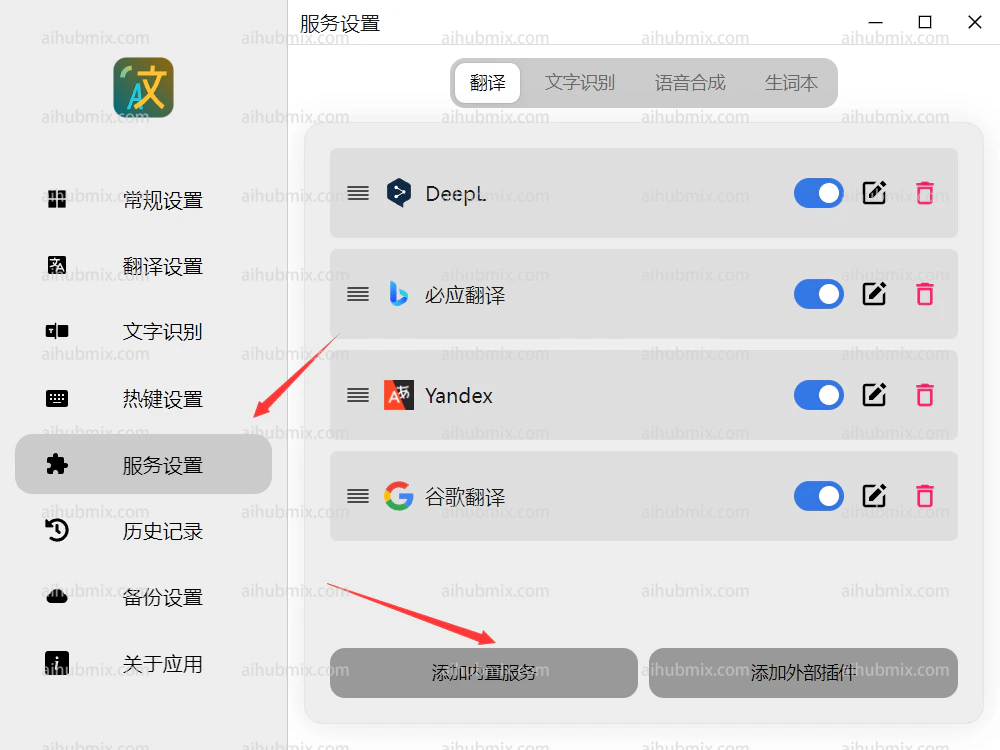 2. 点击 OpenAI\
 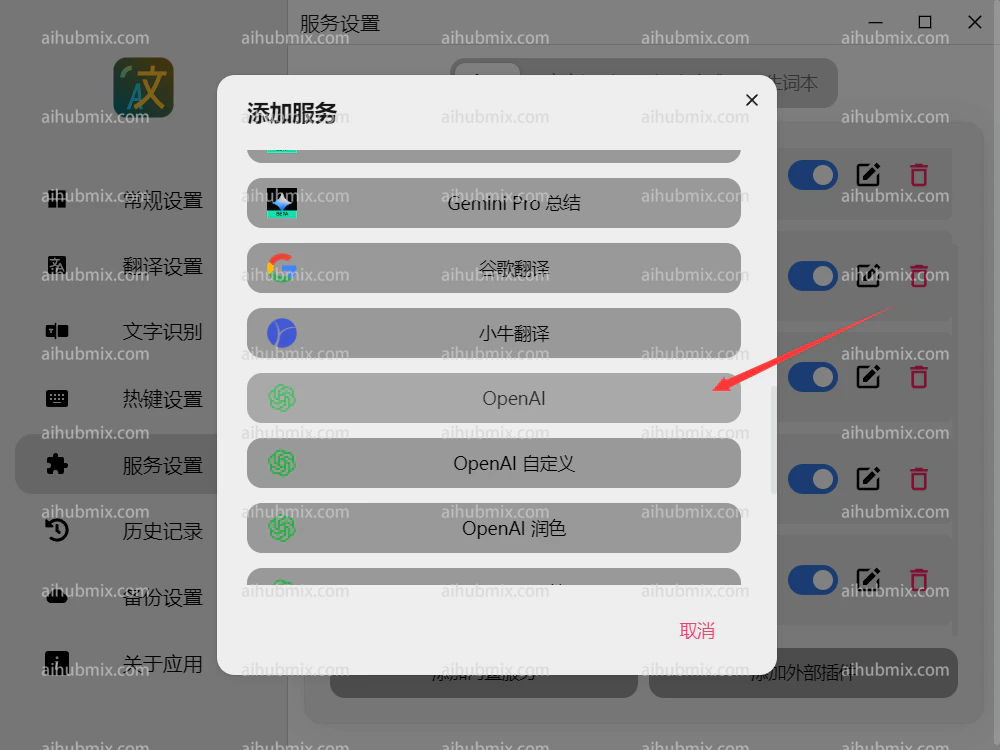 3. 将请求地址设置为
```text theme={null}
https://aihubmix.com
```
4. API key 从[本站的Key](https://aihubmix.com/token)中创建生成。\
3. 将请求地址设置为
```text theme={null}
https://aihubmix.com
```
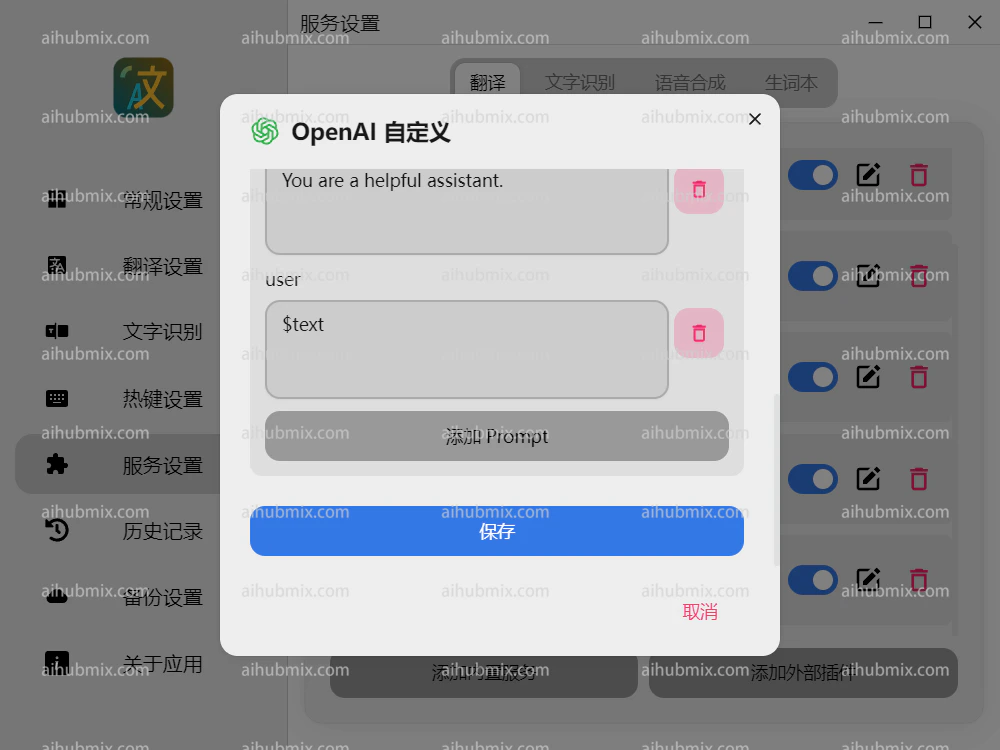
4. API key 从[本站的Key](https://aihubmix.com/token)中创建生成。\ 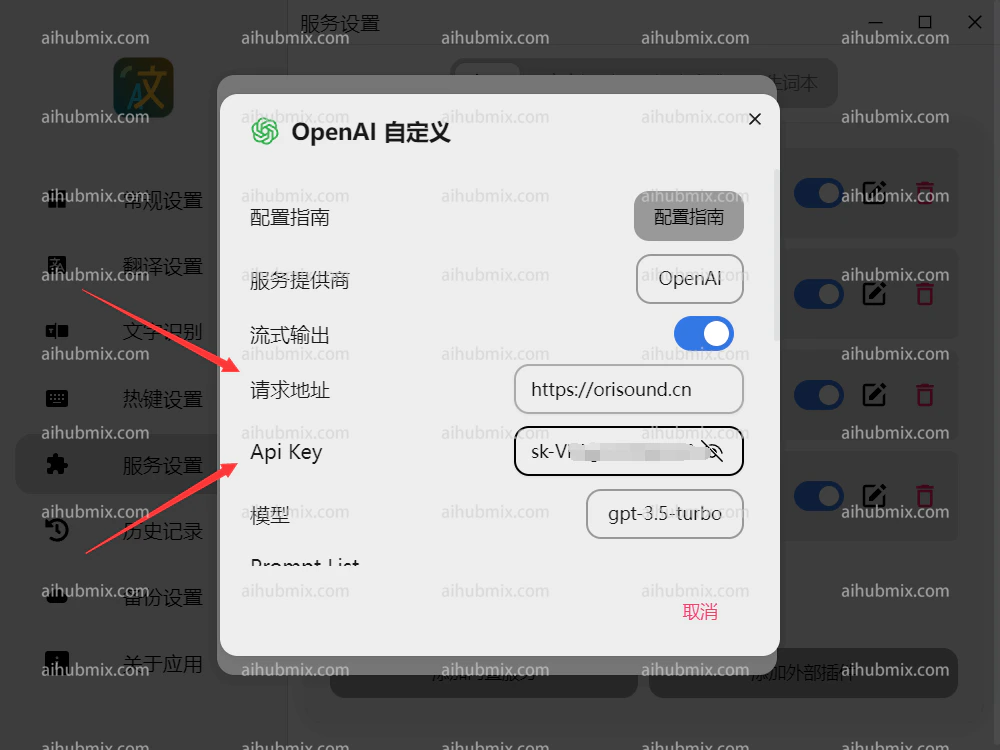 5. 划到下方保存\
  提示:翻译软件建议不要使用openai的o系列和gpt-5系列模型。
## 模型怎么选:翻译场景的最佳实践
划词翻译是**高频、低延迟、低复杂度**的场景,模型选型的核心是"快",不是"强"。
### ⚠️ 不推荐的:o 系列与 GPT-5 系列
**o 系列**(`o1`、`o3`、`o3-mini`、`o4-mini`)和 **GPT-5 系列** 属于**推理型(reasoning)模型**,输出前会先做一段"内部思考"。这在写代码、解数学题时非常强,但**用于翻译反而是负优化**:
| 痛点 | 说明 |
| :---------- | :---------------------------------------- |
| ⏱️ **慢** | 翻译一句话动辄等 5–30 秒,划词翻译体验崩溃 |
| 💸 **贵** | thinking tokens 也计费,单次成本是 GPT-4o 的 5–20 倍 |
| 🎯 **过度发挥** | 推理模型倾向"解释 + 改写",会把"Hello world"翻译出三段注释 |
| 🔧 **参数受限** | 不支持 `temperature`、流式输出等翻译常用调参 |
### 推荐模型(按使用频率排序)
| 模型 | 适用场景 | 速度 | 成本 |
| :------------------ | :------------ | :-- | :--- |
| `gpt-4o-mini` | 日常划词、高频翻译首选 | ⚡⚡⚡ | 💰 |
| `gpt-4o` | 长句、专业术语、文学翻译 | ⚡⚡ | 💰💰 |
| `claude-haiku-4-5` | 中英互译质量极佳,语感自然 | ⚡⚡⚡ | 💰 |
| `claude-sonnet-4-6` | 学术论文、复杂语境 | ⚡⚡ | 💰💰 |
| `gemini-2.5-flash` | 多语种、长文本 | ⚡⚡⚡ | 💰 |
| `deepseek-chat` | 中文输出极顺,性价比之王 | ⚡⚡⚡ | 💰 |
| `qwen-turbo` | 国内场景、中英术语 | ⚡⚡⚡ | 💰 |
> 一句话:翻译要的是"快、准、稳",**关掉推理,选最便宜最快的 chat 模型即可。**
***
## 进阶技巧
### 1. 自定义 Prompt(提升翻译质量)
Pot 的 ChatGPT 服务支持自定义 System Prompt,建议改为:
```text theme={null}
You are a professional translator. Translate the input text to $to.
Rules:
- Output ONLY the translation, no explanation, no quotes.
- Preserve original formatting, line breaks, and punctuation.
- For technical terms, keep the English original in parentheses.
```
### 2. 多服务并排对照
Pot 支持同时启用多个翻译服务,建议组合:
* **左栏**:`gpt-4o-mini`(速度基准)
* **中栏**:`claude-haiku-4-5`(中文语感)
* **右栏**:DeepL 或 Google(传统 MT 对照)
划一次词,三家结果同屏对比,挑最顺的那个。
### 3. OCR + 翻译联动
截图 OCR 推荐组合:
* **识别**:系统原生 OCR(macOS Vision / Win Media OCR,零延迟)
* **翻译**:AIHubMix 的 `gpt-4o-mini`
技术文档、外文截图、Switch 游戏菜单——全都能秒译。
### 4. 本地 HTTP API(自动化玩家专属)
Pot 默认在 `127.0.0.1:60828` 暴露 HTTP 接口,你可以从任何脚本调起翻译 / OCR:
```text theme={null}
# 划词翻译
curl "http://127.0.0.1:60828/translate?text=Hello"
# 截图 OCR
curl "http://127.0.0.1:60828/ocr_recognize"
```
可以接到 Raycast、Alfred、Keyboard Maestro、AutoHotkey 等工具里,做更深的工作流自动化。
***
## 常见问题(FAQ)
**Q1:填了 Key 报 401 怎么办?**\
A:检查 URL 是否多写了 `/v1`,Pot 只需要根域名 `https://aihubmix.com`。
**Q2:能用 Claude / Gemini 吗?Pot 不是只有 ChatGPT 选项?**\
A:能。AIHubMix 把所有模型都封装为 OpenAI 兼容格式,在 Pot 的"模型"字段直接填 `claude-haiku-4-5`、`gemini-2.5-flash` 即可,无需更换服务类型。
**Q3:流式输出有必要开吗?**\
A:建议开。长句翻译边出边显,体感快 3 倍。
**Q4:手机端能用 Pot 吗?**\
A:Pot 只支持桌面三端。手机用户可用其它 OpenAI 兼容客户端,同样接 AIHubMix。
**Q6:Pot 是用什么技术栈写的?性能怎么样?**\
A:基于 Tauri 1.6(Rust + Web 前端),启动 \< 1 秒,常驻内存约 80MB,比 Electron 类应用轻一个数量级。
***
## 相关链接
* 🌐 Pot 官网:[pot-app.com](https://pot-app.com/)
* 📦 Pot GitHub(17.9k ⭐):[github.com/pot-app/pot-desktop](https://github.com/pot-app/pot-desktop)
* 📖 AIHubMix × Pot 官方专题页:[pot-app.com/ads/aihubmix.html](https://pot-app.com/ads/aihubmix.html)
* 🔑 AIHubMix 模型列表:[aihubmix.com](https://aihubmix.com/)
最新更新日期:2026年5月12日
提示:翻译软件建议不要使用openai的o系列和gpt-5系列模型。
## 模型怎么选:翻译场景的最佳实践
划词翻译是**高频、低延迟、低复杂度**的场景,模型选型的核心是"快",不是"强"。
### ⚠️ 不推荐的:o 系列与 GPT-5 系列
**o 系列**(`o1`、`o3`、`o3-mini`、`o4-mini`)和 **GPT-5 系列** 属于**推理型(reasoning)模型**,输出前会先做一段"内部思考"。这在写代码、解数学题时非常强,但**用于翻译反而是负优化**:
| 痛点 | 说明 |
| :---------- | :---------------------------------------- |
| ⏱️ **慢** | 翻译一句话动辄等 5–30 秒,划词翻译体验崩溃 |
| 💸 **贵** | thinking tokens 也计费,单次成本是 GPT-4o 的 5–20 倍 |
| 🎯 **过度发挥** | 推理模型倾向"解释 + 改写",会把"Hello world"翻译出三段注释 |
| 🔧 **参数受限** | 不支持 `temperature`、流式输出等翻译常用调参 |
### 推荐模型(按使用频率排序)
| 模型 | 适用场景 | 速度 | 成本 |
| :------------------ | :------------ | :-- | :--- |
| `gpt-4o-mini` | 日常划词、高频翻译首选 | ⚡⚡⚡ | 💰 |
| `gpt-4o` | 长句、专业术语、文学翻译 | ⚡⚡ | 💰💰 |
| `claude-haiku-4-5` | 中英互译质量极佳,语感自然 | ⚡⚡⚡ | 💰 |
| `claude-sonnet-4-6` | 学术论文、复杂语境 | ⚡⚡ | 💰💰 |
| `gemini-2.5-flash` | 多语种、长文本 | ⚡⚡⚡ | 💰 |
| `deepseek-chat` | 中文输出极顺,性价比之王 | ⚡⚡⚡ | 💰 |
| `qwen-turbo` | 国内场景、中英术语 | ⚡⚡⚡ | 💰 |
> 一句话:翻译要的是"快、准、稳",**关掉推理,选最便宜最快的 chat 模型即可。**
***
## 进阶技巧
### 1. 自定义 Prompt(提升翻译质量)
Pot 的 ChatGPT 服务支持自定义 System Prompt,建议改为:
```text theme={null}
You are a professional translator. Translate the input text to $to.
Rules:
- Output ONLY the translation, no explanation, no quotes.
- Preserve original formatting, line breaks, and punctuation.
- For technical terms, keep the English original in parentheses.
```
### 2. 多服务并排对照
Pot 支持同时启用多个翻译服务,建议组合:
* **左栏**:`gpt-4o-mini`(速度基准)
* **中栏**:`claude-haiku-4-5`(中文语感)
* **右栏**:DeepL 或 Google(传统 MT 对照)
划一次词,三家结果同屏对比,挑最顺的那个。
### 3. OCR + 翻译联动
截图 OCR 推荐组合:
* **识别**:系统原生 OCR(macOS Vision / Win Media OCR,零延迟)
* **翻译**:AIHubMix 的 `gpt-4o-mini`
技术文档、外文截图、Switch 游戏菜单——全都能秒译。
### 4. 本地 HTTP API(自动化玩家专属)
Pot 默认在 `127.0.0.1:60828` 暴露 HTTP 接口,你可以从任何脚本调起翻译 / OCR:
```text theme={null}
# 划词翻译
curl "http://127.0.0.1:60828/translate?text=Hello"
# 截图 OCR
curl "http://127.0.0.1:60828/ocr_recognize"
```
可以接到 Raycast、Alfred、Keyboard Maestro、AutoHotkey 等工具里,做更深的工作流自动化。
***
## 常见问题(FAQ)
**Q1:填了 Key 报 401 怎么办?**\
A:检查 URL 是否多写了 `/v1`,Pot 只需要根域名 `https://aihubmix.com`。
**Q2:能用 Claude / Gemini 吗?Pot 不是只有 ChatGPT 选项?**\
A:能。AIHubMix 把所有模型都封装为 OpenAI 兼容格式,在 Pot 的"模型"字段直接填 `claude-haiku-4-5`、`gemini-2.5-flash` 即可,无需更换服务类型。
**Q3:流式输出有必要开吗?**\
A:建议开。长句翻译边出边显,体感快 3 倍。
**Q4:手机端能用 Pot 吗?**\
A:Pot 只支持桌面三端。手机用户可用其它 OpenAI 兼容客户端,同样接 AIHubMix。
**Q6:Pot 是用什么技术栈写的?性能怎么样?**\
A:基于 Tauri 1.6(Rust + Web 前端),启动 \< 1 秒,常驻内存约 80MB,比 Electron 类应用轻一个数量级。
***
## 相关链接
* 🌐 Pot 官网:[pot-app.com](https://pot-app.com/)
* 📦 Pot GitHub(17.9k ⭐):[github.com/pot-app/pot-desktop](https://github.com/pot-app/pot-desktop)
* 📖 AIHubMix × Pot 官方专题页:[pot-app.com/ads/aihubmix.html](https://pot-app.com/ads/aihubmix.html)
* 🔑 AIHubMix 模型列表:[aihubmix.com](https://aihubmix.com/)
最新更新日期:2026年5月12日