> ## Documentation Index
> Fetch the complete documentation index at: https://docs.aihubmix.com/llms.txt
> Use this file to discover all available pages before exploring further.
# GPT-Academic
> 在 GPT-Academic 中接入 AIHubMix:学术优化工具用单个 API key 调用模型,用于论文润色、翻译与解读。
GPT 学术优化 (GPT Academic)是目前 GitHub 上 **Star 数最高的科研类 LLM 工具之一**,专为科研工作者、研究生、博士生、论文作者打造。仓库地址:[https://github.com/binary-husky/gpt\_academic](https://github.com/binary-husky/gpt_academic)
### 核心功能一览
| 功能模块 | 应用场景 |
| :----------------------- | :----------------------------- |
| 📄 **PDF / LaTeX 论文翻译** | 中英文论文一键互译,保留公式与排版 |
| ✍️ **论文润色与改写** | Grammar、学术语气、Native English 润色 |
| 🧠 **论文摘要 / 综述生成** | 一键生成 Abstract、Related Work |
| 💻 **Python / C++ 项目剖析** | 自动解读整个代码仓库,自译解功能 |
| 🔌 **模块化函数插件** | 自定义快捷按钮,扩展专属工作流 |
| ⚡ **并行问询多模型** | 同时对比 GPT-5、Claude、文心一言答案 |
| 🏠 **本地模型支持** | ChatGLM3、LLaMA2、RWKV、MOSS 等 |
### 支持的大语言模型(LLM)
GPT Academic 已接入几乎所有主流模型:
* **OpenAI 系**:GPT-3.5、GPT-4、GPT-4o
* **Anthropic 系**:Claude 2、Claude 3
* **国产模型**:通义千问、讯飞星火、文心一言、ChatGLM3、DeepSeek Coder
* **开源模型**:LLaMA 2、RWKV、MOSS
## GPT 学术优化 + AIHubMix 配置教程(3 步)
> 💡 **前置条件**:
>
> * 已 clone GPT Academic 仓库到本地
> * 已在 [aihubmix.com](http://aihubmix.com) 注册并获取 API Key
> * Python 3.8+ 环境(已 pip install -r requirements.txt)
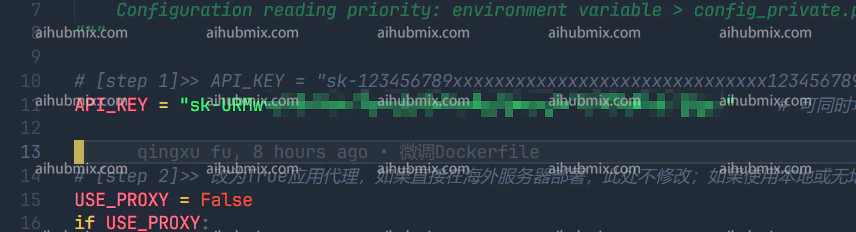
1. 打开 gpt\_academic/config.py 文件:\ 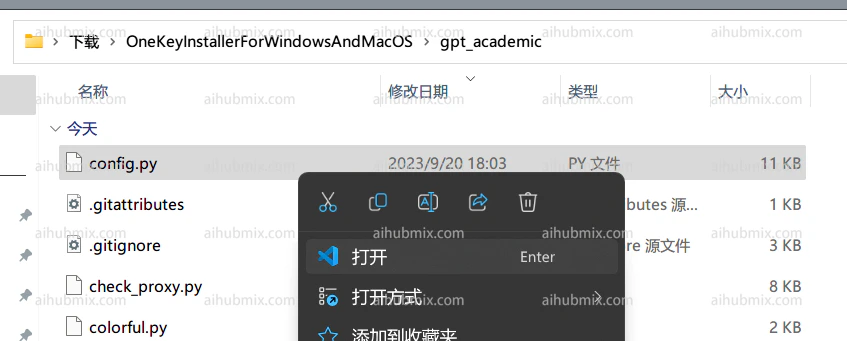 2. 找到 config.py 中的 API\_KEY 变量,将[本站的Key](https://aihubmix.com/token)填入,即可:\
  3. 往下滚动,找到 config.py 中的 API\_URL\_REDIRECT 变量,修改为(直接复制下面的代码块进去就行):
```text theme={null}
API_URL_REDIRECT = {"https://api.openai.com/v1/chat/completions": "https://aihubmix.com/v1/chat/completions"}
```
3. 往下滚动,找到 config.py 中的 API\_URL\_REDIRECT 变量,修改为(直接复制下面的代码块进去就行):
```text theme={null}
API_URL_REDIRECT = {"https://api.openai.com/v1/chat/completions": "https://aihubmix.com/v1/chat/completions"}
```
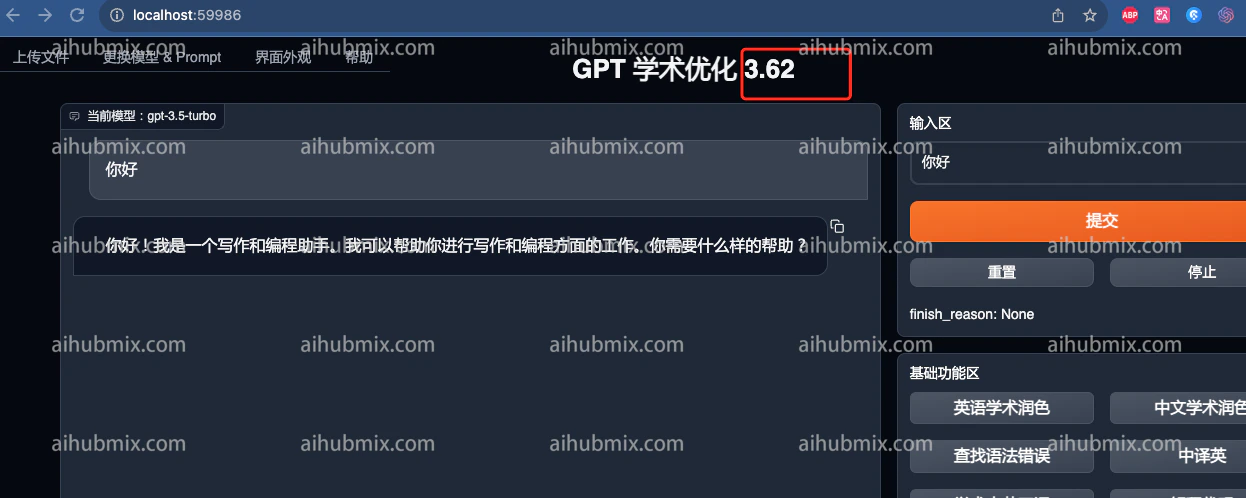
 3. 然后就能使用了\\
 ## 进阶:自定义快捷按钮,打造论文工作流
GPT Academic 最强大的地方在于 **模块化函数插件**。在 [config.py](http://config.py) 中你还可以:
* 自定义高频 Prompt(如「将此段改写为 IEEE 论文风格」)
* 设置默认模型(推荐 GPT-4o 性价比最高)
* 配置代理端口(已通过 AiHubMix,可不设置)
* 启用并行问询,同时对比多个模型答案
GPT 学术优化(GPT Academic)+ AIHubMix 是目前科研工作者 **性价比最高的 AI 论文工作流方案之一**:
* 🚀 **3 步配置**,5 分钟完成
* 💰 **按量付费**
* 🤖 **一 Key 通吃**,GPT-5.5 / Claude / DeepSeek 随意切换
立即开始:
👉 [前往 AiHubMix 注册账号](https://aihubmix.com/)\
👉 [前往 GitHub 下载 GPT Academic](https://github.com/binary-husky/gpt_academic)
**📌 延伸阅读**:
* 《DeepSeek 学术写作测评:论文润色 + 中译英实测(搭配 GPT Academic 食用更佳)》
— \[CSDN 博客]\([https://blog.csdn.net/dinaxuejie/article/details/145374332](https://blog.csdn.net/dinaxuejie/article/details/145374332))
* 《AI 论文写作指南 2026:GPT-5 vs Claude 4 润色 / 降重场景实测对比》
— \[[chatgpt-chinese-guide.com](http://chatgpt-chinese-guide.com)]\([https://www.chatgpt-chinese-guide.com/chatgpt/ai-lunwen-xiezuo-chatgpt-claude-jiangchong-runse-2026.html](https://www.chatgpt-chinese-guide.com/chatgpt/ai-lunwen-xiezuo-chatgpt-claude-jiangchong-runse-2026.html))
最新更新日期:2026年5月13日
## 进阶:自定义快捷按钮,打造论文工作流
GPT Academic 最强大的地方在于 **模块化函数插件**。在 [config.py](http://config.py) 中你还可以:
* 自定义高频 Prompt(如「将此段改写为 IEEE 论文风格」)
* 设置默认模型(推荐 GPT-4o 性价比最高)
* 配置代理端口(已通过 AiHubMix,可不设置)
* 启用并行问询,同时对比多个模型答案
GPT 学术优化(GPT Academic)+ AIHubMix 是目前科研工作者 **性价比最高的 AI 论文工作流方案之一**:
* 🚀 **3 步配置**,5 分钟完成
* 💰 **按量付费**
* 🤖 **一 Key 通吃**,GPT-5.5 / Claude / DeepSeek 随意切换
立即开始:
👉 [前往 AiHubMix 注册账号](https://aihubmix.com/)\
👉 [前往 GitHub 下载 GPT Academic](https://github.com/binary-husky/gpt_academic)
**📌 延伸阅读**:
* 《DeepSeek 学术写作测评:论文润色 + 中译英实测(搭配 GPT Academic 食用更佳)》
— \[CSDN 博客]\([https://blog.csdn.net/dinaxuejie/article/details/145374332](https://blog.csdn.net/dinaxuejie/article/details/145374332))
* 《AI 论文写作指南 2026:GPT-5 vs Claude 4 润色 / 降重场景实测对比》
— \[[chatgpt-chinese-guide.com](http://chatgpt-chinese-guide.com)]\([https://www.chatgpt-chinese-guide.com/chatgpt/ai-lunwen-xiezuo-chatgpt-claude-jiangchong-runse-2026.html](https://www.chatgpt-chinese-guide.com/chatgpt/ai-lunwen-xiezuo-chatgpt-claude-jiangchong-runse-2026.html))
最新更新日期:2026年5月13日