> ## Documentation Index
> Fetch the complete documentation index at: https://docs.aihubmix.com/llms.txt
> Use this file to discover all available pages before exploring further.
# Gemini 新「智绘」
> Gemini 绘图和视频生成指引
## Imagen 绘图
Imagen 是 Google 推出的先进图像生成 AI 模型系列,能够根据文本提示创建高质量、逼真的图像。本指南将帮助您了解如何使用 Imagen 系列 API 生成图像,包括参数设置、模型选择和代码示例。
可用模型列表:
* `imagen-4.0-generate-001`:最新的正式版
* `imagen-4.0-ultra-generate-001`:更高级的 ultra 正式版
* `imagen-4.0-fast-generate-001`:快速版本
* `imagen-4.0-fast-generate-preview-06-06`:快速版本预览版
* `imagen-3.0-generate-002`:3.0 正式版
1. 目前 Imagen 仅支持英文提示词(prompt),集成时建议增加自动翻译,让用户能够无障碍使用
2. 绘制大量文本的表现不稳定,建议只绘制重点关键词
3. 抢先体验期间,Imagen 系列模型同价,后续可能会按官方正式价格调整。
### 模型参数
Imagen 目前仅支持英文提示词,并提供以下参数:
* **numberOfImages**: 要生成的图像数量,范围从 1 到 4(含)。默认值为 4。另外注意 `imagen-4.0-ultra-generate-001` 单次只能生成 1 张。
* **aspectRatio**: 更改生成图像的宽高比。支持的值有 "1:1"、"3:4"、"4:3"、"9:16" 和 "16:9"。默认值为 "1:1"。
* **personGeneration**: 允许模型生成人物图像。支持以下值:
* "DONT\_ALLOW": 阻止生成人物图像。
* "ALLOW\_ADULT": 生成成人图像,但不生成儿童图像。这是默认值。
### 费率
使用 Imagen API 生成图像的费用如下:
* imagen-4-ultra:\$0.06/张
* imagen-4:\$0.04/张
* imagen-4-fast:\$0.02/张
* imagen-3:\$0.03/张
请注意,每次调用可以生成 1-4 张图像,费用将按实际生成的图像数量计算。
### 调用示例
以下是使用 Imagen 生成图像的 Python 调用示例:
```py Imagen theme={null}
import os
import time
from google import genai
from google.genai import types
from PIL import Image
from io import BytesIO
client = genai.Client(
api_key="sk-***", # 🔑 换成你在 AiHubMix 生成的密钥
http_options={"base_url": "https://aihubmix.com/gemini"},
)
# 目前只支持英文 prompt,绘制大量文本的表现较差
response = client.models.generate_images(
model='imagen-4.0-fast-generate-001',
prompt='A minimalist logo for a LLM router market company on a solid white background. trident in a circle as the main symbol, with ONLY text \'InferEra\' below.',
config=types.GenerateImagesConfig(
number_of_images=1,
aspect_ratio="1:1", # supports "1:1", "9:16", "16:9", "3:4", or "4:3".
)
)
script_dir = os.path.dirname(os.path.abspath(__file__))
output_dir = os.path.join(script_dir, "output")
os.makedirs(output_dir, exist_ok=True)
# 生成时间戳作为文件名前缀,避免文件名冲突
timestamp = int(time.time())
# 保存并显示生成的图片
if response and hasattr(response, 'generated_images') and response.generated_images:
for i, generated_image in enumerate(response.generated_images):
try:
image = Image.open(BytesIO(generated_image.image.image_bytes))
image.show()
file_name = f"imagen3_{timestamp}_{i+1}.png"
file_path = os.path.join(output_dir, file_name)
image.save(file_path)
print(f"图片已保存至:{file_path}")
except Exception as e:
print(f"处理图片 {i+1} 时出错:{e}")
else:
print("错误:未收到有效的图片响应")
print(f"响应类型:{type(response)}")
if response:
print(f"响应属性:{dir(response)}")
if hasattr(response, 'generated_images'):
print(f"generated_images 值:{response.generated_images}")
else:
print("响应为空,请检查 API 密钥和网络连接")
```
### 提示词技巧
创建有效的提示词对于获得理想的图像至关重要:
* 使用详细的描述,包括主题、风格、光照、角度等。
* 指定艺术风格(如电影感、写实主义、动漫风格等)。
* 包含技术细节(如 DSLR、高清、细节丰富等)。
* 避免负面或违禁内容。
* **避免在提示词中包含大量文本**,仅使用重点关键词以获得更稳定的结果。
* 关键词包含 `girl` 时容易触发 TypeError: 'NoneType' object is not iterable 报错,不推荐用于人物绘制
## Gemini 2.5 Flash 图像生成
Gemini 也提供了图像生成能力,作为一种替代方案。与 Imagen 系列相比,Gemini 的图像生成更适合于需要上下文理解和推理的场景,而非追求极致的艺术表现和视觉质量。
* 更高的视觉质量 → 相比早前的 exp 版,图像更锐利、更丰富、更清晰。
* 更准确的文本呈现 → 生成的视觉中,文本更加精准、干净、易读。
* 显著减少过滤拦截 → 得益于更智能、宽松的过滤机制,创作时几乎不再被打断。
**说明:**
* 模型 id:`gemini-2.5-flash-image-preview` ,社交媒体上的别名是`nano-banana`
* 费率(输入→输出):Text: \$0.3→\$2.5/M tokens; Image: \$0.3→\$30/M tokens
* 需要新增参数来体验新特性 `"modalities":["text","image"]`
* 图片以 Base64 编码形式传递与输出
* 输出图片的默认尺寸为 1024\*1024px,折合 1290 Tokens
* python 调用需要最新的 openai sdk 支持,请先运行 `pip install -U openai`
* Aihubmix 平台支持 gemini 原生与 OpenAI 兼容则 2 种请求格式
* 了解更多请访问 [Gemini 官方文档](https://ai.google.dev/gemini-api/docs/image-generation)
`gemini-2.0-flash-preview-image-generation` 已经正式升级为 `gemini-2.5-flash-image-preview`,让你的创作流程更流畅、更精彩。
**输入参考结构:**
```json theme={null}
"modalities": ["text","image"]
{
"model": "gemini-2.5-flash-image-preview",
"messages": [
{
"role": "user",
"content": "生成一幅山水画,并给出一首诗词描述"
}
],
"modalities":["text","image"], //需要添加 image
"temperature": 0.7
}'
```
**输出参考结构:**
```json theme={null}
"choices":
[
{
"index": 0,
"message":
{
"role": "assistant",
"content": "Hello! How can I assist you today?",
"refusal": null,
"multi_mod_content": //📍 新增
[
{
"text": "",
"inlineData":
{
"data":"base64 str",
"mimeType":"png"
}
},
{
"text": "hello",
"inlineData":
{
}
}
],
"annotations":
[]
},
"logprobs": null,
"finish_reason": "stop"
}
],
```
### 图文生成
Iuput:text
Output:text + image
```shell Curl theme={null}
IMG_PATH="/your_path/image.jpg"
if [[ "$(base64 --version 2>&1)" = *"FreeBSD"* ]]; then
B64FLAGS="--input"
else
B64FLAGS="-w0"
fi
IMG_BASE64=$(base64 "$B64FLAGS" "$IMG_PATH" 2>&1)
curl https://aihubmix.com/v1/chat/completions \
-H "Content-Type: application/json" \
-H "Authorization: Bearer sk-***" \
-d '{
"model": "gemini-2.5-flash-image-preview",
"messages": [
{
"role": "user",
"content": [
{
"type":"text",
"text":"describe the image with a concise and engaging paragraph, then fill color as children's crayon style"
},
{
"type": "image_url",
"image_url": {
"url": "data:image/jpeg;base64,'$IMG_BASE64'"
}
}
]
}
],
"modalities": ["text","image"],
"temperature": 0.7
}' \
| grep -o '"data":"[^"]*"' \
| cut -d'"' -f4 \
| base64 --decode > /your_path/imageGen.jpg
```
```py OpenAI Python theme={null}
import os
from openai import OpenAI
from PIL import Image
from io import BytesIO
import base64
client = OpenAI(
api_key="sk-***", # 换成你在 AiHubMix 生成的密钥
base_url="https://aihubmix.com/v1",
)
# Using text-only input
response = client.chat.completions.create(
model="gemini-2.5-flash-image-preview",
messages=[
{
"role": "user",
"content": [
{
"type": "text",
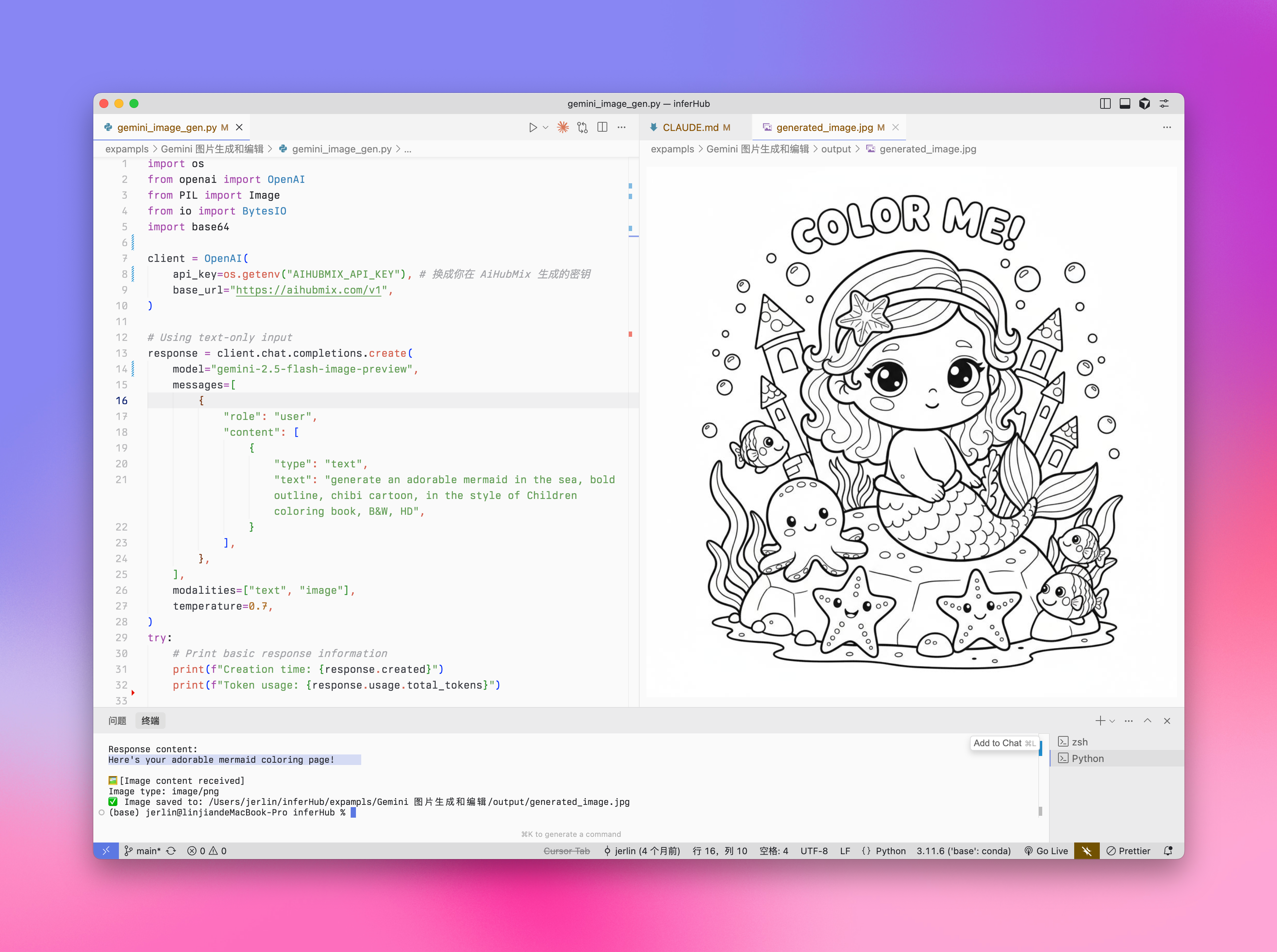
"text": "generate an adorable mermaid in the sea, bold outline, chibi cartoon, in the style of Children coloring book, B&W, HD",
}
],
},
],
modalities=["text", "image"],
temperature=0.7,
)
try:
# Print basic response information
print(f"Creation time: {response.created}")
print(f"Token usage: {response.usage.total_tokens}")
# Check if multi_mod_content field exists
if (
hasattr(response.choices[0].message, "multi_mod_content")
and response.choices[0].message.multi_mod_content is not None
):
print("\nResponse content:")
for part in response.choices[0].message.multi_mod_content:
if "text" in part and part["text"] is not None:
print(part["text"])
# Process image content
elif "inline_data" in part and part["inline_data"] is not None:
print("\n🖼️ [Image content received]")
image_data = base64.b64decode(part["inline_data"]["data"])
mime_type = part["inline_data"].get("mime_type", "image/png")
print(f"Image type: {mime_type}")
image = Image.open(BytesIO(image_data))
image.show()
# Save image
output_dir = os.path.join(os.path.dirname(os.path.abspath(__file__)), "output")
os.makedirs(output_dir, exist_ok=True)
output_path = os.path.join(output_dir, "generated_image.png")
image.save(output_path)
print(f"✅ Image saved to: {output_path}")
else:
print("No valid multimodal response received, check response structure")
except Exception as e:
print(f"Error processing response: {str(e)}")
```
```py Gemini Python theme={null}
import mimetypes
from google import genai
from google.genai import types
import os
def save_binary_file(file_name, data):
f = open(file_name, "wb")
f.write(data)
f.close()
print(f"File saved to to: {file_name}")
def generate():
client = genai.Client(
api_key="sk-***", # 换成你在 AiHubMix 生成的密钥
http_options={"base_url": "https://aihubmix.com/gemini"},
)
model = "gemini-2.5-flash-image-preview"
contents = [
types.Content(
role="user",
parts=[
types.Part.from_text(text="""generate image: an adorable mermaid in the sea, bold outline, chibi cartoon, in the style of Children coloring book, super cute, B&W, HD"""),
],
),
]
generate_content_config = types.GenerateContentConfig(
response_modalities=[
"IMAGE",
"TEXT",
],
)
file_index = 0
for chunk in client.models.generate_content_stream(
model=model,
contents=contents,
config=generate_content_config,
):
if (
chunk.candidates is None
or chunk.candidates[0].content is None
or chunk.candidates[0].content.parts is None
):
continue
if chunk.candidates[0].content.parts[0].inline_data and chunk.candidates[0].content.parts[0].inline_data.data:
file_name = f"ENTER_FILE_NAME_{file_index}"
file_index += 1
inline_data = chunk.candidates[0].content.parts[0].inline_data
data_buffer = inline_data.data
file_extension = mimetypes.guess_extension(inline_data.mime_type)
save_binary_file(f"{file_name}{file_extension}", data_buffer)
else:
print(chunk.text)
if __name__ == "__main__":
generate()
```
**输出实例:**
 ### 图片编辑
Iuput:text + image\
Output:text + image
```py Python theme={null}
import os
from openai import OpenAI
from PIL import Image
from io import BytesIO
import base64
client = OpenAI(
api_key="sk-***", # 换成你在 AiHubMix 生成的密钥
base_url="https://aihubmix.com/v1",
)
project_root = os.path.dirname(os.path.dirname(os.path.abspath(__file__)))
image_path = os.path.join(os.path.dirname(os.path.abspath(__file__)), "resources", "filled.jpg")
if not os.path.exists(image_path):
raise FileNotFoundError(f"image {image_path} not exists")
def encode_image(image_path):
with open(image_path, "rb") as image_file:
return base64.b64encode(image_file.read()).decode("utf-8")
base64_image = encode_image(image_path)
response = client.chat.completions.create(
model="gemini-2.5-flash-image-preview",
messages=[
{
"role": "user",
"content": [
{
"type": "text",
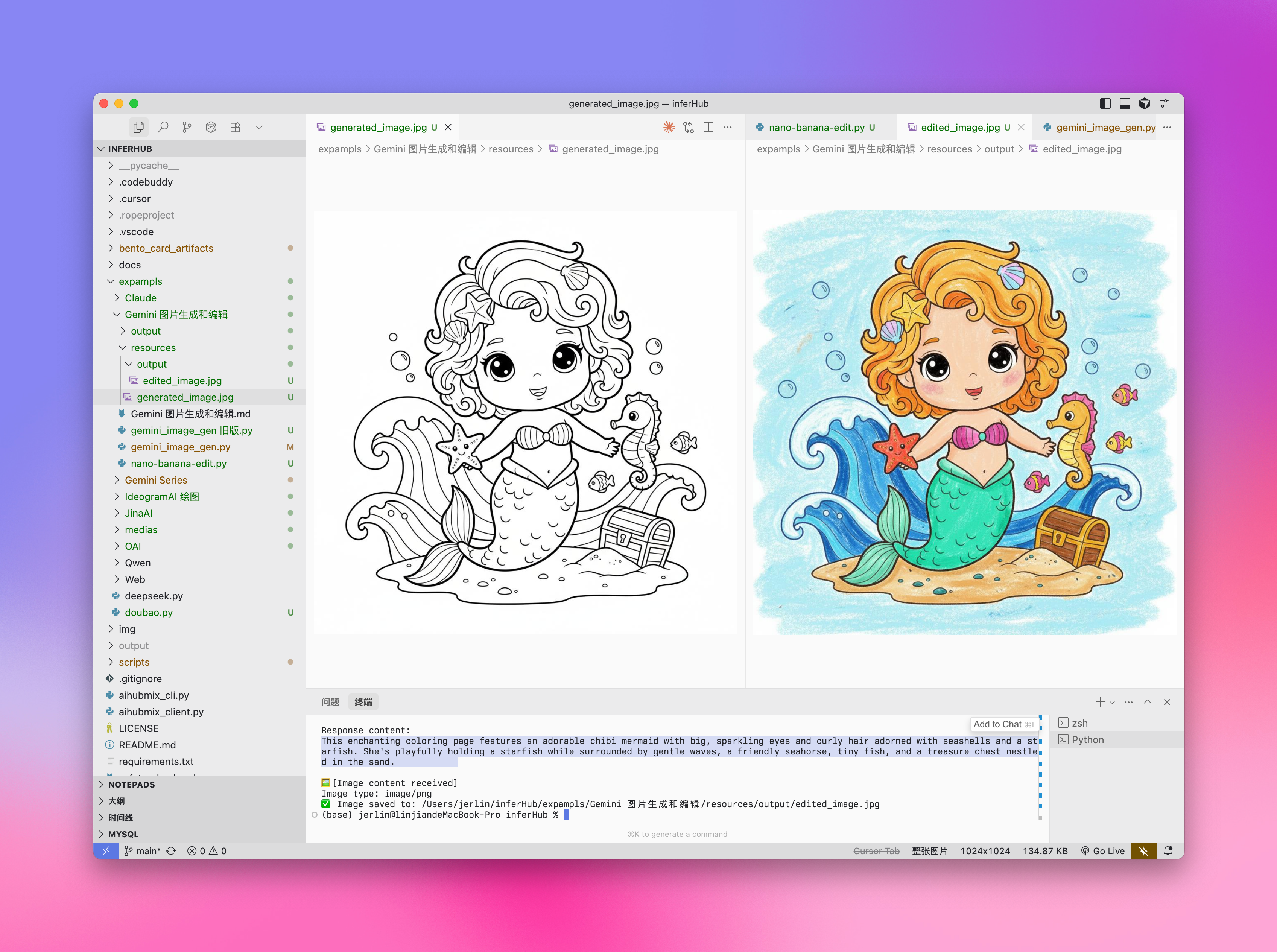
"text": "describe the image with a concise and engaging paragraph, then fill color as children's crayon style",
},
{
"type": "image_url",
"image_url": {"url": f"data:image/jpeg;base64,{base64_image}"},
},
],
},
],
modalities=["text", "image"],
temperature=0.7,
)
try:
# Print basic response information without base64 data
print(f"Creation time: {response.created}")
print(f"Token usage: {response.usage.total_tokens}")
# Check if multi_mod_content field exists
if (
hasattr(response.choices[0].message, "multi_mod_content")
and response.choices[0].message.multi_mod_content is not None
):
print("\nResponse content:")
for part in response.choices[0].message.multi_mod_content:
if "text" in part and part["text"] is not None:
print(part["text"])
# Process image content
elif "inline_data" in part and part["inline_data"] is not None:
print("\n🖼️ [Image content received]")
image_data = base64.b64decode(part["inline_data"]["data"])
mime_type = part["inline_data"].get("mime_type", "image/png")
print(f"Image type: {mime_type}")
image = Image.open(BytesIO(image_data))
image.show()
# Save image
output_dir = os.path.join(os.path.dirname(image_path), "output")
os.makedirs(output_dir, exist_ok=True)
output_path = os.path.join(output_dir, "edited_image.jpg")
image.save(output_path)
print(f"✅ Image saved to: {output_path}")
else:
print("No valid multimodal response received, check response structure")
except Exception as e:
print(f"Error processing response: {str(e)}")
```
**输出实例:**
### 图片编辑
Iuput:text + image\
Output:text + image
```py Python theme={null}
import os
from openai import OpenAI
from PIL import Image
from io import BytesIO
import base64
client = OpenAI(
api_key="sk-***", # 换成你在 AiHubMix 生成的密钥
base_url="https://aihubmix.com/v1",
)
project_root = os.path.dirname(os.path.dirname(os.path.abspath(__file__)))
image_path = os.path.join(os.path.dirname(os.path.abspath(__file__)), "resources", "filled.jpg")
if not os.path.exists(image_path):
raise FileNotFoundError(f"image {image_path} not exists")
def encode_image(image_path):
with open(image_path, "rb") as image_file:
return base64.b64encode(image_file.read()).decode("utf-8")
base64_image = encode_image(image_path)
response = client.chat.completions.create(
model="gemini-2.5-flash-image-preview",
messages=[
{
"role": "user",
"content": [
{
"type": "text",
"text": "describe the image with a concise and engaging paragraph, then fill color as children's crayon style",
},
{
"type": "image_url",
"image_url": {"url": f"data:image/jpeg;base64,{base64_image}"},
},
],
},
],
modalities=["text", "image"],
temperature=0.7,
)
try:
# Print basic response information without base64 data
print(f"Creation time: {response.created}")
print(f"Token usage: {response.usage.total_tokens}")
# Check if multi_mod_content field exists
if (
hasattr(response.choices[0].message, "multi_mod_content")
and response.choices[0].message.multi_mod_content is not None
):
print("\nResponse content:")
for part in response.choices[0].message.multi_mod_content:
if "text" in part and part["text"] is not None:
print(part["text"])
# Process image content
elif "inline_data" in part and part["inline_data"] is not None:
print("\n🖼️ [Image content received]")
image_data = base64.b64decode(part["inline_data"]["data"])
mime_type = part["inline_data"].get("mime_type", "image/png")
print(f"Image type: {mime_type}")
image = Image.open(BytesIO(image_data))
image.show()
# Save image
output_dir = os.path.join(os.path.dirname(image_path), "output")
os.makedirs(output_dir, exist_ok=True)
output_path = os.path.join(output_dir, "edited_image.jpg")
image.save(output_path)
print(f"✅ Image saved to: {output_path}")
else:
print("No valid multimodal response received, check response structure")
except Exception as e:
print(f"Error processing response: {str(e)}")
```
**输出实例:**
 ## 选择正确的绘图模型
### 选择 Gemini 的情况:
* 需要利用世界知识和推理能力生成上下文相关的图像。
* 需要无缝混合文本和图像。
* 希望在长文本序列中嵌入准确的视觉内容。
* 希望在保持上下文的同时以对话方式编辑图像。
### 选择 Imagen 的情况:
* 图像质量、照片真实感、艺术细节或特定风格(如印象派、动漫)是首要考虑因素。
* 执行专业编辑任务,如产品背景更新或图像放大。
* 注入品牌、风格或生成标志和产品设计。
### 最佳实践
1. **优化提示词**:精心设计提示词,这是获得高质量输出的关键。
2. **实验参数**:尝试不同的宽高比和设置,找到最适合您需求的配置。
3. **批量生成**:生成多张图像以增加获得理想结果的机会。
4. **保存元数据**:将提示词和时间戳与图像一起保存,以便追踪和复制成功的结果。
5. **遵守使用政策**:确保您的使用符合 Google 的内容政策和使用条款。
## Veo 3.0 视频生成
VEO 3.0 是由 Google DeepMind 开发的最新先进视频生成模型。使用 [VEO 3.0](https://aihubmix.com/models?model=veo-3.0-generate-preview),您可以生成具有以下特点的视频:
* 从文本和图像提示中生成的质量提升
* 语音,例如对话和配音
* 音频,例如音乐和声音效果
1. 目前 VEO 3.0 仅支持英文提示词(prompt),集成时建议增加自动翻译
2. 视频通常在几分钟内生成完成,但高峰期可能需要更长时间
3. 目前不支持用图片进行对话生成的视频
### 已知限制
目前 VEO 3.0 的参数固定,无法更改:
* **分辨率**: 720p(横屏)
* **帧率**: 24fps
* **视频长度**: 8秒
### 费率
使用 VEO 3.0 API 的费用是 **\$0.675/秒**(Aihubmix 提供 10% 限时优惠)
### 调用示例
VEO 3.0 目前仅支持 curl 命令调用,采用两步处理方式:
其中:`sk-***` 换成你在 AiHubMix 生成的密钥。
```shell 步骤 1:发起生成请求 theme={null}
curl "https://aihubmix.com/gemini/v1beta/models/veo-3.0-generate-preview:predictLongRunning?key=sk-***" \
-H "Content-Type: application/json" \
-X "POST" \
-d '{
"instances":
[
{
"prompt": "A cat playing with a ball"
}
],
"parameters":
{
"numberOfVideos": 1,
"durationSeconds": 8,
"aspectRatio": "16:9",
"personGeneration": "dont_allow"
}
}'
```
```shell 步骤 2:获取生成结果 theme={null}
# 使用步骤 1 返回的 name 字段中的操作ID
curl "https://aihubmix.com/gemini/v1beta/models/veo-3.0-generate-preview/operations/ff5***?key=sk-***"
```
```py 视频提取脚本 theme={null}
import json
import base64
# 1. 读入响应 JSON 文件
with open('yourpath/response.json', 'r') as f:
data = json.load(f)
# 2. 获取 base64 编码的视频字符串
b64_str = data['response']['videos'][0]['bytesBase64Encoded']
# 3. 解码并写入 mp4 文件
with open('output.mp4', 'wb') as f:
f.write(base64.b64decode(b64_str))
print("视频已保存为 output.mp4")
```
### 返回示例
**步骤 1 返回:**
```json theme={null}
{
"name": "models/veo-3.0-generate-preview/operations/ff5***"
}
```
**步骤 2 返回(生成完成):**
```json theme={null}
{
"name": "projects/ahm-gemini-03/locations/us-central1/publishers/google/models/veo-3.0-generate-preview/operations/ff5***",
"done": true,
"response": {
"@type": "type.googleapis.com/cloud.ai.large_models.vision.GenerateVideoResponse",
"raiMediaFilteredCount": 0,
"videos": [
{
"bytesBase64Encoded": "AAA...2xl",
"mimeType": "video/mp4"
}
]
}
}
```
**步骤 2 返回(仍在处理中):**
```json theme={null}
{
"name": "projects/ahm-gemini-03/locations/us-central1/publishers/google/models/veo-3.0-generate-preview/operations/777***"
}
```
如果收到处理中的返回,请稍等几分钟后重新发送步骤 2 的请求。
**视频效果:**
### 最佳实践
1. **耐心等待**:视频生成通常需要几分钟,高峰期可能更长
2. **检查状态**:如果返回中没有 `done: true`,说明仍在处理中
3. **保存操作 ID**:确保保存步骤 1 返回的操作 ID 用于后续查询
4. **遵守使用政策**:确保您的使用符合 Google 的内容政策和使用条款
更多信息请参考 [Vertex AI 官方文档](https://cloud.google.com/vertex-ai/generative-ai/docs/video/generate-videos)
## Veo 2.0 视频生成
VEO 2.0 是 Google 推出的先进视频生成 AI 模型,能够根据文本提示创建高质量、逼真的短视频。下面的指南将帮助您了解如何使用 VEO 2.0 API 生成视频,包括参数设置、模型选择和代码示例。
1. 目前 VEO 2.0 仅支持英文提示词(prompt),集成时建议增加自动翻译,让用户能够无障碍使用
2. 生成视频需要耗时 2-3 分钟,请耐心等待
### 模型参数
VEO 2.0 提供以下参数:
* **numberOfVideos**: 要生成的视频数量,可选 1 或 2。默认值为 2。
* **aspectRatio**: 生成视频的宽高比。支持的值有 "16:9" 和 "9:16"。
* **durationSeconds**: 视频时长,可选 5 秒或 8 秒。默认值为 8 秒。
* **personGeneration**: 控制是否允许生成含人物的视频。支持以下值:
* "dont\_allow": 阻止生成含人物的视频。
* "allow\_adult": 允许生成含成人的视频,但不生成儿童视频。
### 费率
使用 VEO 2.0 API 的费用是 \$0.35/秒
### 调用示例
以下是使用 VEO 2.0 生成视频的 Python 调用示例:
```py 文生视频 theme={null}
import os
import time
from google import genai
from google.genai import types
client = genai.Client(
api_key="sk-***", # 换成你在 AiHubMix 生成的密钥
http_options={"base_url": "https://aihubmix.com/gemini"},
)
operation = client.models.generate_videos(
model="veo-2.0-generate-001",
prompt="Panning wide shot of a calico kitten sleeping in the sunshine",
config=types.GenerateVideosConfig(
person_generation="dont_allow", # "dont_allow" 或 "allow_adult"
aspect_ratio="16:9", # "16:9" 或 "9:16"
number_of_videos=1, # 整数,可选 1、2,默认 2
durationSeconds=5, # 整数,可选 5、8,默认 8
),
)
# 耗时 2-3 分钟,视频时长 5-8s
while not operation.done:
time.sleep(20)
operation = client.operations.get(operation)
for n, generated_video in enumerate(operation.response.generated_videos):
client.files.download(file=generated_video.video)
generated_video.video.save(f"video{n}.mp4") # 保存视频
```
```py 参考图驱动 theme={null}
import os
import time
from google import genai
from google.genai import types
def load_image(path):
with open(path, "rb") as image_file:
return image_file.read()
client = genai.Client(
api_key="sk-***", # 换成你在 AiHubMix 生成的密钥
http_options={"base_url": "https://aihubmix.com/gemini"},
)
operation = client.models.generate_videos(
model="veo-2.0-generate-001",
prompt="The waves in the background keep flowing",
image=types.Image(
mime_type="image/png",
image_bytes=load_image("img/inferbanner.png") # 使用你的图片路径
),
config=types.GenerateVideosConfig(
person_generation="dont_allow",
aspect_ratio="16:9",
numberOfVideos=1,
durationSeconds=5,
),
)
while not operation.done:
time.sleep(20)
operation = client.operations.get(operation)
for n, generated_video in enumerate(operation.response.generated_videos):
client.files.download(file=generated_video.video)
generated_video.video.save(f"video{n}.mp4")
```
### 提示词技巧
创建有效的提示词对于获得理想的视频至关重要:
* 描述清晰的场景、动作和氛围
* 指定拍摄风格(如全景、特写、跟踪镜头等)
* 描述光照条件(如阳光明媚、黄昏、室内灯光等)
* 指明主体对象及其动作(如"猫咪在阳光下睡觉")
* 避免过于复杂的叙事或快速变化的场景
* 避免负面或违禁内容
### 最佳实践
1. **简洁明了的提示词**:使用清晰、具体的描述来指导视频生成。
2. **耐心等待**:视频生成需要 2-3 分钟,请耐心等待完成。
3. **测试不同参数**:尝试不同的宽高比和时长,找到最适合您需求的设置。
4. **保存生成记录**:将提示词与生成的视频一起记录,以便追踪成功的结果。
5. **遵守使用政策**:确保您的使用符合 Google 的内容政策和使用条款。
***
更新时间:2026-06-01
## 选择正确的绘图模型
### 选择 Gemini 的情况:
* 需要利用世界知识和推理能力生成上下文相关的图像。
* 需要无缝混合文本和图像。
* 希望在长文本序列中嵌入准确的视觉内容。
* 希望在保持上下文的同时以对话方式编辑图像。
### 选择 Imagen 的情况:
* 图像质量、照片真实感、艺术细节或特定风格(如印象派、动漫)是首要考虑因素。
* 执行专业编辑任务,如产品背景更新或图像放大。
* 注入品牌、风格或生成标志和产品设计。
### 最佳实践
1. **优化提示词**:精心设计提示词,这是获得高质量输出的关键。
2. **实验参数**:尝试不同的宽高比和设置,找到最适合您需求的配置。
3. **批量生成**:生成多张图像以增加获得理想结果的机会。
4. **保存元数据**:将提示词和时间戳与图像一起保存,以便追踪和复制成功的结果。
5. **遵守使用政策**:确保您的使用符合 Google 的内容政策和使用条款。
## Veo 3.0 视频生成
VEO 3.0 是由 Google DeepMind 开发的最新先进视频生成模型。使用 [VEO 3.0](https://aihubmix.com/models?model=veo-3.0-generate-preview),您可以生成具有以下特点的视频:
* 从文本和图像提示中生成的质量提升
* 语音,例如对话和配音
* 音频,例如音乐和声音效果
1. 目前 VEO 3.0 仅支持英文提示词(prompt),集成时建议增加自动翻译
2. 视频通常在几分钟内生成完成,但高峰期可能需要更长时间
3. 目前不支持用图片进行对话生成的视频
### 已知限制
目前 VEO 3.0 的参数固定,无法更改:
* **分辨率**: 720p(横屏)
* **帧率**: 24fps
* **视频长度**: 8秒
### 费率
使用 VEO 3.0 API 的费用是 **\$0.675/秒**(Aihubmix 提供 10% 限时优惠)
### 调用示例
VEO 3.0 目前仅支持 curl 命令调用,采用两步处理方式:
其中:`sk-***` 换成你在 AiHubMix 生成的密钥。
```shell 步骤 1:发起生成请求 theme={null}
curl "https://aihubmix.com/gemini/v1beta/models/veo-3.0-generate-preview:predictLongRunning?key=sk-***" \
-H "Content-Type: application/json" \
-X "POST" \
-d '{
"instances":
[
{
"prompt": "A cat playing with a ball"
}
],
"parameters":
{
"numberOfVideos": 1,
"durationSeconds": 8,
"aspectRatio": "16:9",
"personGeneration": "dont_allow"
}
}'
```
```shell 步骤 2:获取生成结果 theme={null}
# 使用步骤 1 返回的 name 字段中的操作ID
curl "https://aihubmix.com/gemini/v1beta/models/veo-3.0-generate-preview/operations/ff5***?key=sk-***"
```
```py 视频提取脚本 theme={null}
import json
import base64
# 1. 读入响应 JSON 文件
with open('yourpath/response.json', 'r') as f:
data = json.load(f)
# 2. 获取 base64 编码的视频字符串
b64_str = data['response']['videos'][0]['bytesBase64Encoded']
# 3. 解码并写入 mp4 文件
with open('output.mp4', 'wb') as f:
f.write(base64.b64decode(b64_str))
print("视频已保存为 output.mp4")
```
### 返回示例
**步骤 1 返回:**
```json theme={null}
{
"name": "models/veo-3.0-generate-preview/operations/ff5***"
}
```
**步骤 2 返回(生成完成):**
```json theme={null}
{
"name": "projects/ahm-gemini-03/locations/us-central1/publishers/google/models/veo-3.0-generate-preview/operations/ff5***",
"done": true,
"response": {
"@type": "type.googleapis.com/cloud.ai.large_models.vision.GenerateVideoResponse",
"raiMediaFilteredCount": 0,
"videos": [
{
"bytesBase64Encoded": "AAA...2xl",
"mimeType": "video/mp4"
}
]
}
}
```
**步骤 2 返回(仍在处理中):**
```json theme={null}
{
"name": "projects/ahm-gemini-03/locations/us-central1/publishers/google/models/veo-3.0-generate-preview/operations/777***"
}
```
如果收到处理中的返回,请稍等几分钟后重新发送步骤 2 的请求。
**视频效果:**
### 最佳实践
1. **耐心等待**:视频生成通常需要几分钟,高峰期可能更长
2. **检查状态**:如果返回中没有 `done: true`,说明仍在处理中
3. **保存操作 ID**:确保保存步骤 1 返回的操作 ID 用于后续查询
4. **遵守使用政策**:确保您的使用符合 Google 的内容政策和使用条款
更多信息请参考 [Vertex AI 官方文档](https://cloud.google.com/vertex-ai/generative-ai/docs/video/generate-videos)
## Veo 2.0 视频生成
VEO 2.0 是 Google 推出的先进视频生成 AI 模型,能够根据文本提示创建高质量、逼真的短视频。下面的指南将帮助您了解如何使用 VEO 2.0 API 生成视频,包括参数设置、模型选择和代码示例。
1. 目前 VEO 2.0 仅支持英文提示词(prompt),集成时建议增加自动翻译,让用户能够无障碍使用
2. 生成视频需要耗时 2-3 分钟,请耐心等待
### 模型参数
VEO 2.0 提供以下参数:
* **numberOfVideos**: 要生成的视频数量,可选 1 或 2。默认值为 2。
* **aspectRatio**: 生成视频的宽高比。支持的值有 "16:9" 和 "9:16"。
* **durationSeconds**: 视频时长,可选 5 秒或 8 秒。默认值为 8 秒。
* **personGeneration**: 控制是否允许生成含人物的视频。支持以下值:
* "dont\_allow": 阻止生成含人物的视频。
* "allow\_adult": 允许生成含成人的视频,但不生成儿童视频。
### 费率
使用 VEO 2.0 API 的费用是 \$0.35/秒
### 调用示例
以下是使用 VEO 2.0 生成视频的 Python 调用示例:
```py 文生视频 theme={null}
import os
import time
from google import genai
from google.genai import types
client = genai.Client(
api_key="sk-***", # 换成你在 AiHubMix 生成的密钥
http_options={"base_url": "https://aihubmix.com/gemini"},
)
operation = client.models.generate_videos(
model="veo-2.0-generate-001",
prompt="Panning wide shot of a calico kitten sleeping in the sunshine",
config=types.GenerateVideosConfig(
person_generation="dont_allow", # "dont_allow" 或 "allow_adult"
aspect_ratio="16:9", # "16:9" 或 "9:16"
number_of_videos=1, # 整数,可选 1、2,默认 2
durationSeconds=5, # 整数,可选 5、8,默认 8
),
)
# 耗时 2-3 分钟,视频时长 5-8s
while not operation.done:
time.sleep(20)
operation = client.operations.get(operation)
for n, generated_video in enumerate(operation.response.generated_videos):
client.files.download(file=generated_video.video)
generated_video.video.save(f"video{n}.mp4") # 保存视频
```
```py 参考图驱动 theme={null}
import os
import time
from google import genai
from google.genai import types
def load_image(path):
with open(path, "rb") as image_file:
return image_file.read()
client = genai.Client(
api_key="sk-***", # 换成你在 AiHubMix 生成的密钥
http_options={"base_url": "https://aihubmix.com/gemini"},
)
operation = client.models.generate_videos(
model="veo-2.0-generate-001",
prompt="The waves in the background keep flowing",
image=types.Image(
mime_type="image/png",
image_bytes=load_image("img/inferbanner.png") # 使用你的图片路径
),
config=types.GenerateVideosConfig(
person_generation="dont_allow",
aspect_ratio="16:9",
numberOfVideos=1,
durationSeconds=5,
),
)
while not operation.done:
time.sleep(20)
operation = client.operations.get(operation)
for n, generated_video in enumerate(operation.response.generated_videos):
client.files.download(file=generated_video.video)
generated_video.video.save(f"video{n}.mp4")
```
### 提示词技巧
创建有效的提示词对于获得理想的视频至关重要:
* 描述清晰的场景、动作和氛围
* 指定拍摄风格(如全景、特写、跟踪镜头等)
* 描述光照条件(如阳光明媚、黄昏、室内灯光等)
* 指明主体对象及其动作(如"猫咪在阳光下睡觉")
* 避免过于复杂的叙事或快速变化的场景
* 避免负面或违禁内容
### 最佳实践
1. **简洁明了的提示词**:使用清晰、具体的描述来指导视频生成。
2. **耐心等待**:视频生成需要 2-3 分钟,请耐心等待完成。
3. **测试不同参数**:尝试不同的宽高比和时长,找到最适合您需求的设置。
4. **保存生成记录**:将提示词与生成的视频一起记录,以便追踪成功的结果。
5. **遵守使用政策**:确保您的使用符合 Google 的内容政策和使用条款。
***
更新时间:2026-06-01